
Speech to PDF Converter
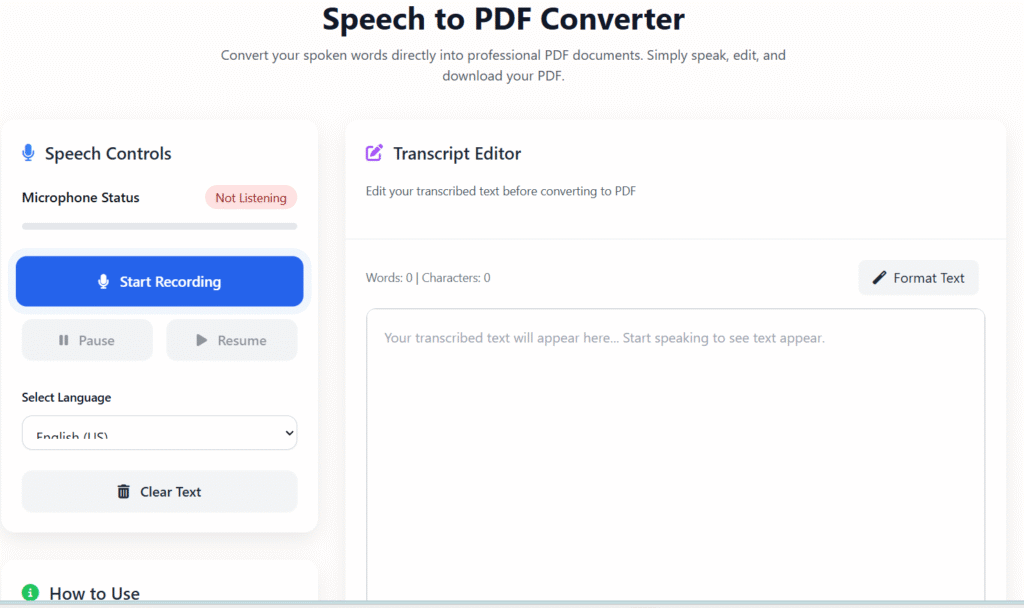
Convert your spoken words directly into professional PDF documents. Simply speak, edit, and download your PDF.
Speech Controls
How to Use
- Click “Start Recording” to begin speech recognition
- Speak clearly into your microphone
- Edit the transcribed text as needed
- Click “Generate PDF” to create and download your PDF
Transcript Editor
Edit your transcribed text before converting to PDF
PDF Settings
Recent Activity
Total Recording Time
0 min
PDFs Generated
0
Words Transcribed
0
🎙️ Speech to PDF Converter Online – Convert Voice into PDF Instantly
Last updated: Dec 2025
Speech to PDF Converter Online helps you turn spoken words into clean, downloadable PDF documents in seconds. Instead of typing long content manually, you can simply speak and let our smart tool do the work.
This tool is built for students, professionals, creators, and businesses who want fast, accurate, and private voice-to-PDF conversion — all inside a browser, with no sign-up required.
👉 Start speaking now and download your PDF instantly.
🔍 What Is a Speech to PDF Converter?
A Speech to PDF Converter Online is a tool that listens to your voice, converts it into readable text, and automatically formats that text into a PDF file.
It removes the need for:
- Manual typing
- Expensive transcription software
- Time-consuming document formatting
With one click, your speech becomes a professional PDF. 📄
🧭 Who Is This Tool For?
This tool is designed for real users with real needs:
- 🎓 Students converting lectures into notes
- 🧑💼 Professionals creating meeting summaries
- 🧑🏫 Teachers preparing study material
- ✍️ Writers & bloggers capturing ideas quickly
- 🎙️ Podcasters turning audio into documents
- ♿ Accessibility users who prefer speaking over typing
If you speak, this tool works for you.
⚙️ How to Use the Speech to PDF Converter
Using our tool is simple and beginner friendly.
Step-by-Step Guide:
- Open the Speech to PDF Converter on regalia360.com
- Allow microphone access in your browser
- Click Start Recording and speak clearly
- Review the converted text on screen
- Click Generate PDF
- Download your PDF instantly
⏱️ No login. No installation. No learning curve.
👉 Speak now and create your PDF in seconds.
🌟 Key Features of Speech to PDF Converter Online
🎧 Accurate Speech Recognition
- Converts speech into readable, structured text
- Works well for long recordings and lectures
📄 Instant PDF Creation
- Automatically formats text into a clean PDF
- Ready for printing or sharing
🌍 Multi-Language Support
- Supports multiple languages and accents
- Ideal for global users
⚡ Fast & Lightweight
- Optimized for speed and performance
- Works smoothly on low-end devices
🔐 Privacy-Focused Design
- No audio files stored
- No tracking or selling of data
💻 Cross-Device Compatibility
- Works on desktop, tablet, and mobile
- Compatible with all modern browsers
🎯 Benefits of Using Speech to PDF
Using this tool saves time, effort, and mental energy.
Key Benefits:
- ✅ Save hours of typing
- ✅ Increase productivity instantly
- ✅ Reduce spelling and formatting errors
- ✅ Create professional documents easily
- ✅ Improve accessibility for all users
- ✅ Perfect for multitasking workflows
One tool. Multiple benefits. Zero complexity.
📚 Practical Use Cases (Real-World Value)
🎓 Students
Convert lectures, presentations, and spoken notes into study-ready PDFs.
🧑💼 Office & Remote Work
Record meetings and instantly generate written summaries.
✍️ Content Creators
Speak ideas naturally and turn them into structured documents.
🧑🏫 Teachers & Trainers
Create learning materials without manual typing.
🏥 Medical & Research Notes
Quickly document spoken observations into secure PDFs.
common mistakes when using speech-to-PDF tools:
- Poor Audio Quality – Background noise or low mic quality reduces accuracy.
- Fast or Mumbled Speech – Hard for software to transcribe correctly.
- Ignoring Formatting – Direct conversion often misses headings, paragraphs, or bullet points.
- Not Proofreading – Automated transcription may have errors or misheard words.
- Unsupported Languages/Accents – Some tools struggle with certain accents or dialects.
- Overloading with Content – Very long recordings may cause processing errors.
- Skipping Updates – Using outdated software can limit features or accuracy.
🔐 Trust, Security & Privacy
At regalia360.com, privacy is not optional — it’s built-in.
We follow strict data protection practices:
- 🔒 No audio storage
- 🔒 No account required
- 🔒 No personal data collection
- 🔒 Secure browser-based processing
Your voice stays yours — always.
🚀 Why Choose Regalia360’s tool?
We don’t just build tools — we build useful tools.
What Makes Us Different:
- ⚡ Fast-loading pages (Core Web Vitals optimized)
- 🧠 Simple, distraction-free interface
- 📱 Mobile-first design
- 📄 Clean output PDFs
- 💡 Built for real users, not bots
This makes our tool both user-friendly and Google-friendly.
❓ Frequently Asked Questions (FAQs)
Is this tool free?
Yes. The tool is completely free to use.
Do I need to install any software?
No. Everything works directly in your browser.
Can I convert long speech recordings?
Yes, it supports extended speech sessions.
Is my voice data saved?
No. Audio is processed temporarily and never stored.
Can I edit text before downloading the PDF?
Yes, you can review and adjust the text before exporting.
📣 Call to Action
🎙️ Start speaking now and convert your voice into a PDF instantly!
No typing. No signup. Just results.
👉 Use tool on regalia360.com today.