
In today’s fast-paced, data-driven world, businesses generate and receive thousands of PDF documents daily. From invoices and contracts to reports and forms, PDFs are an essential format for sharing and preserving information. They are reliable for visual presentation but not ideal for automation or machine processing.
This is where PDF to XML conversion becomes invaluable. By converting static PDFs into structured XML data, organizations can streamline workflows, reduce errors, and unlock significant efficiency gains. In this guide, we’ll explore what PDF to XML conversion is, why it matters, when to use it, and how businesses can implement it effectively.
Understanding PDFs: Strengths and Limitations
PDF (Portable Document Format) was designed by Adobe to preserve document formatting across devices and platforms. It ensures that text, images, and layout appear the same regardless of the device or software used to view the file.
While this makes PDFs excellent for human reading, it presents challenges for automated systems.
Why PDFs Are Hard for Data Extraction
- Text stored visually: PDF text is often positioned visually on a page, without clear logical structure.
- Tables are unstructured: Many PDFs display tables as formatted text rather than clearly defined rows and columns.
- Varied layouts: Different documents may present the same information in different ways.
- Scanned PDFs: These contain images of text rather than actual text, requiring optical character recognition (OCR) to extract content.
As a result, manually extracting data from PDFs is slow, error-prone, and costly, especially when handling high volumes of documents.
What Is XML and Why Businesses Use It
XML (eXtensible Markup Language) is a machine-readable format that structures data hierarchically. Unlike PDFs, XML clearly identifies data fields, relationships between values, and the hierarchy of information.
Benefits of XML for Businesses
- System integration: XML is compatible with ERP, CRM, and other enterprise software.
- Automation-friendly: Structured XML allows automated workflows without human intervention.
- Human- and machine-readable: While machines process XML efficiently, humans can also understand it.
- Data consistency: XML ensures uniformity, reducing errors in data handling.
These qualities make XML ideal for businesses that need reliable, structured data from a large volume of documents.
What PDF to XML Conversion Means
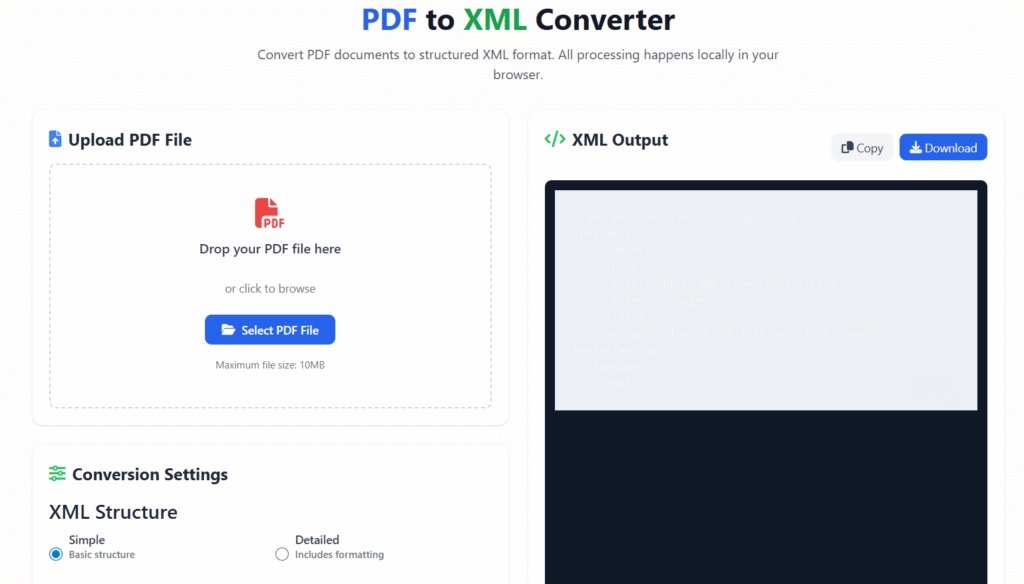
PDF to XML conversion is the process of extracting data from PDF documents and transforming it into a structured XML format.
Instead of relying on humans to read and input data, systems can:
- Identify fields such as invoice number, date, or total amount
- Capture the corresponding values
- Map them into predefined XML tags that reflect the data hierarchy
This transformation allows seamless integration into software systems and enables automated data workflows.
When PDF to XML Conversion Is Essential
Not every PDF requires conversion, but in many scenarios, it is crucial.
Common Use Cases
- Finance and accounting: Processing invoices, purchase orders, and expense reports
- Healthcare and insurance: Extracting claims, patient data, or policy details
- Government and legal: Digitizing compliance documents, contracts, or archival records
- Retail and e-commerce: Managing product catalogs, pricing lists, or inventory updates
Signs Your Business Needs Conversion
- Manual data entry is slowing down operations
- High error rates in document handling
- Large volumes of PDF documents to process
- Repetitive data extraction tasks
If these challenges exist, PDF to XML conversion can save time, reduce errors, and improve scalability.
Why Businesses Prefer XML Over PDFs
Converting PDFs to XML offers multiple advantages over retaining PDF files in their original format:
- Automation and Speed: Data flows automatically between systems without manual input.
- Higher Accuracy: Structured data reduces human error and ensures consistency.
- Scalability: XML handles large volumes of data efficiently, even across departments.
- Cost Savings: Automation reduces labor costs and operational delays over time.
By transforming PDFs into XML, businesses can modernize operations and focus on strategic tasks instead of repetitive data entry.
How this tool Works
Modern conversion involves several stages to ensure accuracy and usability.
Step 1: Document Ingestion
PDFs are uploaded or imported into the conversion system, ready for processing.
Step 2: Text Recognition
For scanned PDFs or images, OCR (Optical Character Recognition) technology extracts text from images. High-quality OCR improves accuracy and reduces post-processing work.
Step 3: Layout Analysis
The system identifies tables, fields, labels, and relationships in the document. Advanced AI algorithms can detect complex layouts that vary across documents.
Step 4: Data Mapping
Extracted content is mapped into XML tags according to a predefined schema, ensuring the data hierarchy and field names remain consistent.
Step 5: Validation
Output is validated against the XML schema to check accuracy and ensure compliance with expected formats. Random quality checks may also be performed to maintain reliability.
Methods for PDF to XML Conversion
Different approaches exist depending on document volume, complexity, and available resources.
- Manual Conversion
- Suitable for very small document volumes
- Time-consuming and prone to human error
- Rule-Based Tools
- Use predefined templates to identify fields
- Effective for documents with consistent layouts
- AI and OCR-Based Solutions
- Best for complex or variable document layouts
- Can process scanned PDFs efficiently
- Learns from corrections to improve accuracy over time
Most businesses prefer automated AI-driven solutions for scalability and reduced manual effort.
Best Practices for Accurate Conversion
Ensuring reliable XML output requires careful preparation and validation.
- Prepare High-Quality PDFs: Use clear, legible scans and avoid skewed or blurry documents.
- Define a Proper XML Schema: Maintain consistent tag names and plan the data hierarchy in advance.
- Validate Output Regularly: Use XML validators and perform random quality checks to maintain data integrity.
- Standardize Document Formats: Reduces variation and simplifies mapping during conversion.
Following these best practices ensures that XML output is clean, consistent, and ready for automated workflows.
Common Challenges and Solutions
Even with advanced tools, certain challenges may arise:
Complex Tables
Some PDFs have multi-level or irregular tables that are difficult to map.
Solution: AI-based layout detection can accurately identify rows, columns, and merged cells.
Low-Quality Scans
Scanned PDFs with poor resolution or skewed text reduce OCR accuracy.
Solution: Preprocess documents using image enhancement tools to improve clarity before conversion.
Data Inconsistency
Inconsistent formatting across multiple PDFs complicates extraction.
Solution: Standardize document templates wherever possible to maintain uniformity.
Industry Applications of this tool
PDF to XML conversion benefits organizations across multiple sectors:
- Finance & Accounting: Automate invoice processing, expense reconciliation, and financial reporting.
- Healthcare & Insurance: Streamline patient data extraction, claims processing, and regulatory reporting.
- Retail & E-Commerce: Manage product catalogs, pricing updates, and inventory automation.
- Government & Legal: Digitize compliance documents, contracts, and archival records for efficient retrieval.
In each case, structured XML data allows for faster processing, improved accuracy, and seamless integration with enterprise systems.
Choosing the Right PDF to XML Solution
Selecting the best tool requires considering several factors:
- Accuracy Rate: Ensure the solution delivers high precision, especially for complex documents.
- Scanned PDF Support: Verify OCR capability for image-based documents.
- Custom Schema Support: The tool should allow mapping to your unique XML structure.
- Security & Compliance: Sensitive data should be handled securely with encryption and access control.
- Scalability: Cloud-based tools offer scalability, while on-premise solutions are preferred for sensitive or regulated data.
- Pricing Transparency: Understand costs upfront to avoid unexpected charges.
A careful evaluation ensures the tool fits both technical and business requirements.
Frequently Asked Questions (FAQs)
Q1: Is PDF to XML conversion accurate?
Yes. Accuracy is high with AI-based tools, especially when PDFs are clean and schemas are clearly defined.
Q2: Can scanned PDFs be converted?
Yes. OCR technology extracts text from scanned images before mapping it into XML.
Q3: Is XML better than JSON?
It depends. XML is ideal for document-heavy, hierarchical data, while JSON is lighter and better suited for APIs.
Q4: How long does conversion take?
Processing time depends on file size and complexity, ranging from seconds for simple documents to minutes for large, complex PDFs.
Conclusion:
For businesses that handle large volumes of PDFs, this tool is more than just a convenience — it’s a necessity.
It unlocks automation, ensures data accuracy, improves scalability, and reduces operational costs. By converting static PDFs into structured XML, organizations can focus on strategic initiatives instead of repetitive data entry.
Investing in a reliable conversion solution prepares your business for future growth and digital transformation, making it an essential part of modern data management strategies.