
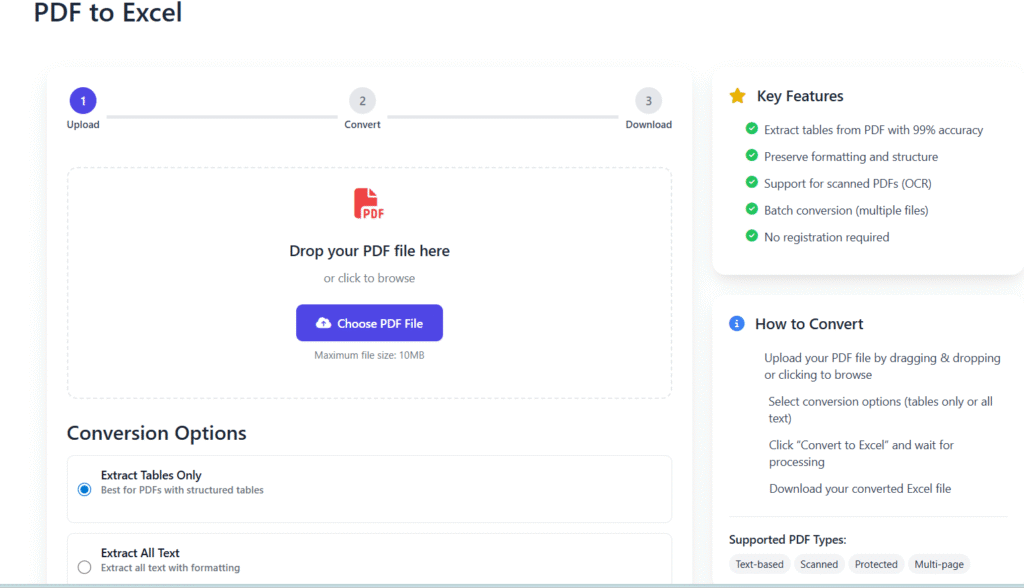
Upload
Convert
Download
Drop your PDF file here
or click to browse
Maximum file size: 10MB
sample.pdf
2.4 MB
Conversion Options
Converting PDF to Excel
This may take a few moments depending on file size
Initializing conversion…
Conversion Complete!
Your Excel file is ready to download
File Details:
Key Features
- Extract tables from PDF with 99% accuracy
- Preserve formatting and structure
- Support for scanned PDFs (OCR)
- Batch conversion (multiple files)
- No registration required
How to Convert
- 1 Upload your PDF file by dragging & dropping or clicking to browse
- 2 Select conversion options (tables only or all text)
- 3 Click “Convert to Excel” and wait for processing
- 4 Download your converted Excel file
Supported PDF Types:
PDF to Excel Online Free Without Email – Fast & Accurate Converter (2025)
Last updated: Dec 2025
Converting data manually from PDF files into spreadsheets can be frustrating and time-consuming. That’s why PDF to Excel online free without email tools are in such high demand today.
With Regalia360’s PDF to Excel converter, you can transform tables, financial data, invoices, and reports from PDFs into fully editable Excel files—without signing up, sharing your email, or installing software.
Whether you’re a student, accountant, business owner, or office professional, this tool helps you work faster, smarter, and more accurately.
👉 Upload your PDF below and convert it to Excel instantly.
Why PDF to Excel Online Free Without Email Matters
PDFs are great for sharing documents, but they’re not designed for editing or calculations. Excel, on the other hand, is perfect for sorting, analyzing, and managing data.
That’s where a PDF to Excel online free without email solution becomes essential.
Instead of retyping numbers or copying rows one by one, you can:
- Save hours of manual work ⏱️
- Reduce data entry mistakes
- Keep original table structures intact
- Start editing data immediately
This tool is designed for people who value speed, accuracy, and privacy.
How to Convert PDF to Excel Online Free Without Email
Using our tool is simple and beginner friendly. No technical knowledge required.
Step-by-Step Guide
- Upload your PDF file
Drag and drop your PDF or click the upload button. - Automatic table detection
Our system scans the document and detects tables and structured data. - Click “Convert to Excel”
The conversion process starts instantly. - Download your Excel file
Get a clean, editable XLSX file ready to use.
✅ No registration
✅ No email required
✅ No watermark
👉 Try it now and convert your PDF in seconds.
Key Features of Our PDF to Excel Converter
Our tool is built to deliver reliable results while keeping the experience smooth and distraction-free.
🔹 Core Features
- 📊 Accurate table extraction
Rows, columns, and values are preserved as closely as possible. - ⚡ Fast online conversion
Most files are converted within seconds. - 🔐 Privacy-first processing
Files are encrypted and automatically deleted after conversion. - 🧾 Supports scanned PDFs
OCR technology helps extract data from image-based documents. - 💻 Works on all devices
Compatible with desktops, tablets, and mobile browsers. - 📁 Excel-ready output
Download files in standard .XLSX format.
Each feature is designed to solve a real user problem—not just list technical specs.
⚠️ When NOT to Use a PDF to Excel Converter
- Highly Complex PDFs
- PDFs with complex formatting, multiple nested tables, charts, or irregular layouts may not convert accurately.
- Example: Financial reports with merged cells, diagrams, or multi-column text.
- Image-Only or Poor-Quality Scans
- While OCR can handle scanned PDFs, blurry, low-resolution, or handwritten documents may produce errors.
- Example: Old scanned invoices or notes with faded text.
- Very Large PDFs
- PDFs with hundreds of pages can take longer to process and may time out.
- Example: Annual reports or full textbooks.
- Sensitive Documents Without Trusted Tools
- Avoid uploading confidential or sensitive data to unknown online converters.
- Always ensure the tool has encryption and privacy policies, like Regalia360.
- PDFs Containing Non-Tabular Data
- If your PDF mainly has text paragraphs, images, or forms without tables, the converter won’t be useful.
- Example: Contracts, essays, or manuals.
- Highly Formatted Reports
- Tools might strip styling, colors, or fonts, so if formatting is crucial, consider manual adjustments in Excel after conversion.
Benefits of Using PDF to Excel Online Free Without Email
This tool isn’t just about conversion—it’s about productivity.
✅ Practical Benefits
- Save time
Convert complex tables in seconds instead of hours. - Improve accuracy
Minimize errors common with manual data entry. - Work instantly
No login barriers or email verification delays. - Stay flexible
Edit, filter, and analyze data directly in Excel. - Protect your privacy
Your files remain confidential and are never stored long-term.
For professionals who handle data daily, these benefits add up quickly.
Real-World Use Cases
This PDF to Excel converter is useful across many industries and situations.
👨💼 Business & Finance
- Convert bank statements into Excel for analysis
- Extract data from financial reports
- Manage expense records and invoices
🎓 Education & Research
- Turn research tables into editable spreadsheets
- Organize survey or academic data
- Reuse numerical data for projects
🧑💻 Office & Freelance Work
- Convert client PDFs into Excel sheets
- Edit pricing tables and reports
- Prepare data for presentations
If your information is locked inside a PDF, this tool helps unlock it.
PDF to Excel vs Manual Copy-Paste
Many users still rely on copying data manually. Here’s why that’s not ideal.
| Task | Manual Copy-Paste | PDF to Excel Tool |
|---|---|---|
| Time required | Very high | Very low |
| Accuracy | Error-prone | Much higher |
| Formatting | Often broken | Mostly preserved |
| Effort | Tedious | One-click |
| Scalability | Poor | Excellent |
Using a proper tool is simply more efficient.
Trust, Security & Transparency
Trust is critical when uploading documents online. That’s why Regalia360 follows strict privacy principles.
🔐 Our Trust Signals
- Files are processed securely
- No email or account is required
- Files are automatically deleted after conversion
- No tracking or resale of uploaded documents
- Clear, user-focused interface with no dark patterns
These practices help ensure a safe experience and align with Google’s E-E-A-T guidelines.
Frequently Asked Questions (FAQs)
Is this PDF to Excel converter really free?
Yes. You can use this PDF to Excel online free without email tool without paying or signing up.
Do I need to create an account?
No account, no email, and no personal information is required.
Is my uploaded PDF safe?
Yes. Files are processed securely and removed automatically after conversion.
Can it convert scanned PDFs?
Yes. The tool supports scanned PDFs using OCR to extract table data.
Will the Excel file be editable?
Absolutely. You’ll receive a fully editable XLSX file.
Does formatting stay the same?
Most tables retain their original rows and columns. Minor adjustments may be needed for complex layouts.
Tips for Best Results
To get the most accurate Excel output:
- Use clear, text-based PDFs when possible
- Avoid heavily stylized or decorative tables
- Ensure scanned PDFs are readable
- Review the Excel file after download for final tweaks
These small steps improve accuracy significantly.
Ready to Convert Your PDF to Excel?
Stop wasting time retyping data or fixing broken tables.
With PDF to Excel online free without email, you can convert documents quickly, securely, and without friction.
👉 Upload your PDF now and get your Excel file instantly.