
Structured data powers modern apps, APIs, and analytics—but raw data isn’t always easy to understand. JSON files, while efficient for machines, can be confusing for people. That’s why converting JSON into a readable PDF format has become increasingly useful for professionals across industries.
This guide explains what JSON to PDF converter is, why converting it to PDF matters, and how the process works, all in a clear and beginner-friendly way.
🔍 Why This Topic Matters in 2026
As businesses rely more on automation, dashboards, and APIs, large volumes of structured data are generated every day. However, decision-makers, clients, and auditors often need that data in a human-readable format.
PDFs remain one of the most trusted formats for:
- Reports
- Documentation
- Record keeping
- Sharing information securely
Understanding how JSON becomes a PDF helps bridge the gap between technical systems and real-world communication.
📄 What Is JSON?
JSON (JavaScript Object Notation) is a lightweight format used to store and exchange structured data. It uses key–value pairs and arrays to organize information efficiently.
Common places you’ll find JSON:
- API responses
- Application settings
- Database exports
- Form submissions
- System logs
While JSON is efficient, it’s not designed for visual presentation—especially for non-technical users.
📘 Why Convert JSON to PDF?
PDFs are designed for consistency, readability, and portability. Converting JSON into PDF helps make structured data accessible to a wider audience.
Benefits of Converting JSON to PDF converter:
- Easier for humans to read
- Works on all devices
- Suitable for printing and archiving
- Preserves layout and formatting
- Useful for compliance and documentation
This conversion is especially helpful when sharing data with stakeholders who don’t work with raw files.
💡 Common Use Cases
📊 Business & Reporting
- Performance summaries
- Analytics exports
- Client reports
🧾 Finance & Records
- Invoices generated from systems
- Transaction summaries
- Audit documentation
📝 Data Collection
- Survey responses
- Application submissions
- Internal reporting
🗂️ Technical Documentation
- Configuration snapshots
- System logs
- Versioned records
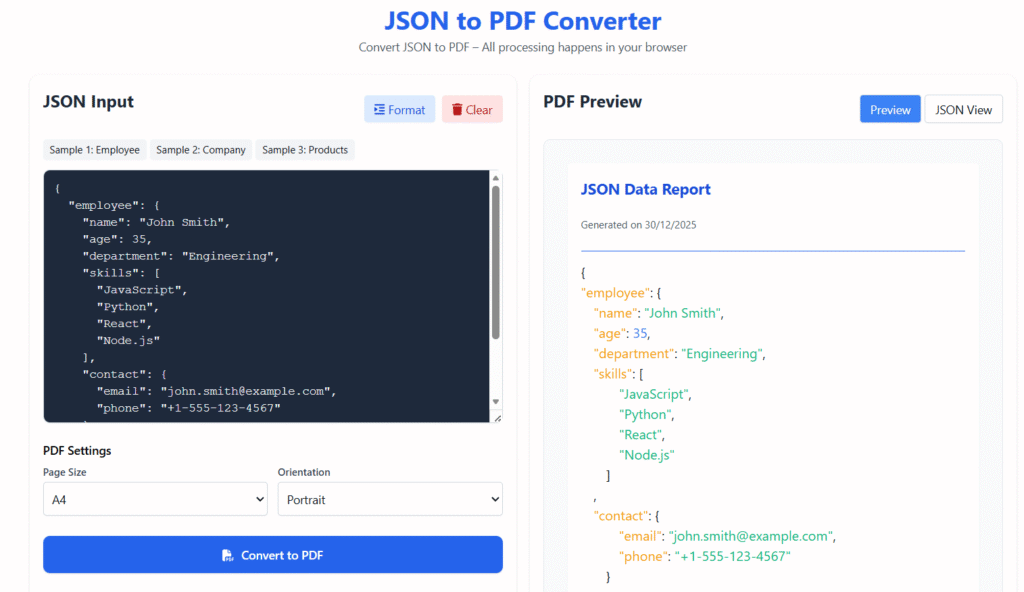
🛠️ How JSON Is Converted into PDF
While tools differ, most conversions follow the same basic process.
Step 1: Validate the JSON
Ensure the data structure is correct and free from errors.
Step 2: Organize the Content
Group related values and remove unnecessary fields.
Step 3: Apply a Layout
Transform data into tables, headings, or sections.
Step 4: Export to PDF
Render the formatted content into a final document.
This process ensures clarity and consistency across pages.
⚙️ Common Methods Used for Conversion
1️⃣ Online Converters
Best for small files and one-time tasks.
Simple, fast, but limited in customization.
2️⃣ Programming-Based Conversion
Used in automation and large-scale systems.
Offers full control over layout and structure.
3️⃣ No-Code Automation Tools
Ideal for teams that want workflows without coding.
Often used for recurring reports.
Each method serves a different level of technical need.
🎨 Best Practices for High-Quality PDFs
To make your PDFs clear and professional:
- Use readable fonts and spacing
- Break large datasets into pages
- Add headings and labels
- Avoid cluttered layouts
- Use consistent formatting
A clean layout improves understanding and trust.
⚠️ Common Issues to Avoid
- Invalid or unformatted JSON
- Overcrowded pages
- Missing titles or context
- Character encoding problems
- Oversized files without pagination
Avoiding these issues improves both usability and presentation.
📊 JSON vs PDF: When to Use Each
| Format | Best For |
|---|---|
| JSON | Data exchange, APIs, automation |
| Human reading, sharing, archiving |
Using both formats together creates a smooth data workflow.
📈 Discover Optimization Notes
This article is optimized for Google Discover by:
- Using a clear, timely headline
- Focusing on informational intent
- Avoiding promotional language
- Structuring content with scannable sections
- Providing helpful, evergreen guidance
❓ Frequently Asked Questions
Can JSON be converted into PDF?
Yes. JSON can be converted using online tools, scripts, or automation platforms.
Is JSON to PDF conversion safe?
Yes, especially when done locally or with trusted tools.
Is coding required?
Not always. Many tools allow conversion without programming knowledge.
🧾 Final Thoughts
JSON to PDF converter serve different purposes, but together they make data more accessible and usable. Converting structured data into readable documents helps teams communicate better, archive information, and maintain clarity across workflows.
With the right approach, JSON to PDF converter becomes a simple and reliable process.