
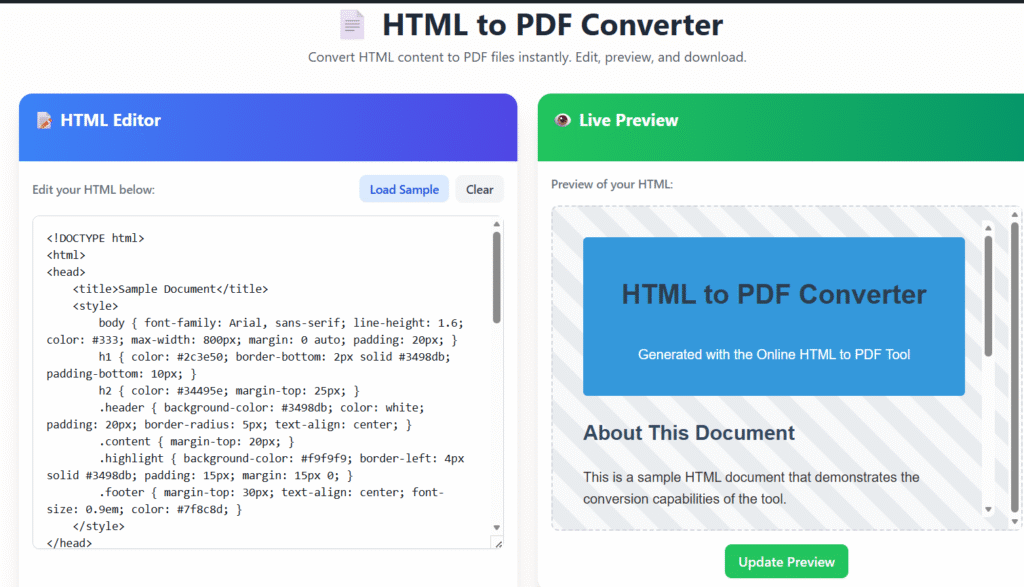
📄 HTML to PDF Converter
Convert HTML content to PDF files instantly. Edit, preview, and download.
📝 HTML Editor
👁️ Live Preview
⚙️ PDF Settings
💡 Quick Tips
Styling
Use inline CSS or embedded styles for best results.
Images
Use absolute URLs for images to ensure proper rendering.
Testing
Always preview before generating the final PDF.
HTML to PDF Converter Online Free
Convert HTML to PDF Converter Online Free with Clean, Professional Results
Last updated: Dec 2025
HTML to PDF Converter Online Free is a simple, reliable tool from Regalia360 that helps you convert HTML code or live web pages into high-quality PDF files—directly from your browser.
Whether you’re saving a webpage, exporting HTML designs, or generating printable documents, this tool ensures your content looks exactly the way you expect—no broken layouts, no unnecessary steps, and no technical complexity.
👉 Paste your HTML or enter a webpage URL below and convert it to PDF instantly.
Why Convert HTML to PDF?
HTML is excellent for displaying content online, but PDF remains the preferred format for:
- Sharing documents professionally
- Printing content without layout issues
- Archiving webpages or reports
- Sending invoices, resumes, or proposals
- Preserving content for offline access
With our tool , you get the best of both formats—flexibility of HTML and reliability of PDF.
How to Use the HTML to PDF Converter Online Free
Converting your HTML content takes only a few seconds.
Step-by-step guide:
- Open the HTML to PDF Converter Online Free on regalia360.com
- Choose one option:
- Paste your HTML source code
- Enter a live webpage URL
- Click the Convert to PDF button
- Download your PDF instantly
✅ No sign-up required
✅ No watermark added
✅ No software installation
👉 Try it now and generate your PDF in seconds.
Key Features
Our tool is designed for speed, accuracy, and ease of use.
🚀 Fast Conversion
- Converts HTML to PDF in seconds
- No waiting queues or processing delays
🎨 Accurate Layout Rendering
- Maintains original HTML structure
- Supports CSS, fonts, images, and tables
- Preserves spacing and alignment
🔒 Privacy-Focused & Secure
- Files are processed securely
- No permanent storage of uploaded content
- HTTPS-enabled environment
🌐 Browser-Based Tool
- Works on Chrome, Firefox, Edge, and Safari
- No plugins or downloads required
📱 Mobile & Desktop Friendly
- Fully responsive interface
- Works smoothly on smartphones, tablets, and desktops
💯 Free & Unlimited Use
- No daily limits
- No hidden costs
- No forced account creation
common mistakes when converting HTML to PDF
- Unsupported CSS/JS – Advanced CSS (flexbox, grid) or JavaScript may not render correctly.
- Missing assets – Images, fonts, or CSS files not loading due to wrong paths or blocked URLs.
- Ignoring page breaks – Content gets cut off without proper
page-breakrules. - Viewport issues – Layout breaks if print-specific styles aren’t defined (
@media print). - Font problems – Custom fonts not embedded or unsupported.
- Large file sizes – Unoptimized images increase PDF size.
- Different rendering engines – Browsers vs PDF engines (wkhtmltopdf, Puppeteer) behave differently.
- Not testing output – PDFs look different across viewers and devices.
Benefits
This tool is built for real-world needs, not just technical users.
👨💻 For Developers
- Convert HTML templates into PDFs
- Generate invoices, receipts, and reports
- Test print-ready layouts quickly
🧑💼 For Businesses
- Save webpages as professional PDFs
- Create client-ready documents
- Share branded reports and proposals
🎓 For Students & Educators
- Save research pages as PDFs
- Convert assignments written in HTML
- Store educational content offline
✍️ For Content Creators & Marketers
- Archive landing pages
- Share web content as downloadable PDFs
- Maintain layout consistency across platforms
Real Use Cases (Clear User Intent)
Here’s how people actually use our HTML to PDF Converter Online Free:
- Saving a website page before content updates
- Exporting HTML invoices into printable PDFs
- Creating offline documentation
- Sending legal or compliance records
- Turning HTML email templates into PDFs
Each use case is supported without extra steps or technical barriers.
Why Choose Regalia360?
At Regalia360, we focus on usefulness, transparency, and trust.
Our commitment includes:
- ✅ Simple tools with clear purpose
- ✅ No misleading claims
- ✅ No unnecessary data collection
- ✅ User-first design and experience
We continuously improve our tools based on user feedback and real usage scenarios.
Trust & Privacy You Can Rely On 🔐
We understand privacy matters.
- Your HTML content is never shared
- Files are automatically deleted after processing
- No tracking of personal data
- Secure HTTPS encryption
You stay in full control of your data at all times.
HTML to PDF vs Other Tools
Many online tools come with limitations.
Common issues elsewhere:
- Forced registration
- Watermarked PDFs
- Limited daily conversions
- Poor layout rendering
What makes our tool different:
- ✔ Truly free usage
- ✔ Clean, professional PDFs
- ✔ Accurate HTML rendering
- ✔ No interruptions or popups
Helpful Tips for Best Results
To get the most accurate PDF output:
- Use well-structured HTML
- Ensure images are hosted properly
- Include inline or linked CSS
- Avoid unsupported scripts
Following these tips helps ensure your PDF matches your original layout.
Frequently Asked Questions (FAQs)
❓ Is the HTML to PDF free?
Yes. The tool is completely free and does not require payment or registration.
❓ Will my PDF include a watermark?
No. All PDFs generated are clean and watermark-free.
❓ Can I convert a live website to PDF?
Yes. Just paste the webpage URL, and the tool will convert it for you.
❓ Is my data stored or shared?
No. Files are processed temporarily and deleted automatically.
❓ Does it support CSS and images?
Yes. The converter supports common HTML and CSS elements, images, and fonts.
❓ Can I use this tool on mobile devices?
Absolutely. The tool works on both mobile and desktop browsers.
Designed for SEO, Speed & User Experience
This page is built with:
- ⚡ Fast loading performance
- 📱 Mobile-first layout
- 🧭 Clear navigation
- 🧠 Easy-to-scan content
These elements help users—and search engines—understand the page clearly.
Call to Action 🚀
👉 Paste your HTML code or webpage URL below and convert it to PDF instantly.
No sign-up. No watermark. Just fast, reliable results.
Final Thoughts
If you’re searching for a simple, trustworthy, and effective HTML to PDF Converter Online Free, Regalia360 delivers exactly that.
Our goal is to provide tools that are:
- Easy to understand
- Free to use
- Respectful of user privacy
- Useful for real-world tasks
Bookmark this page and return whenever you need clean, professional PDF output from HTML—without hassle.