
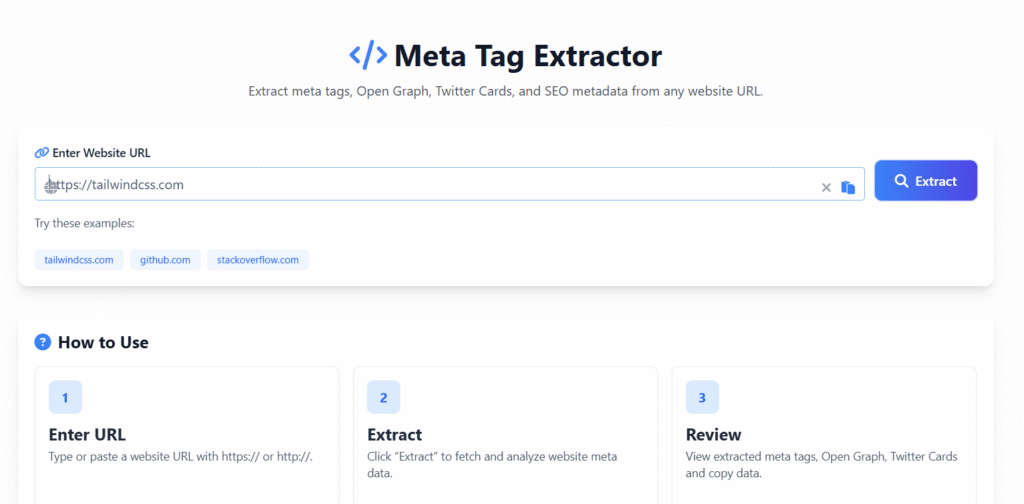
Meta Tag Extractor
Extract meta tags, Open Graph, Twitter Cards, and SEO metadata from any website URL.
Try these examples:
Extracting Meta Tags
Analyzing website metadata…
Extracted Meta Tags
Basic Meta Tags
0
Open Graph Tags
0
Twitter Cards
0
All Meta Tags
Raw Meta Data
How to Use
Enter URL
Type or paste a website URL with https:// or http://.
Extract
Click “Extract” to fetch and analyze website meta data.
Review
View extracted meta tags, Open Graph, Twitter Cards and copy data.
🔍 Extract Meta Tags Tool – Free Online SEO Metadata Extractor
Last updated: Dec 2025
Welcome to the Extract Meta Tags Tool, your ultimate solution to quickly extract meta titles, meta descriptions, and heading tags from any website. Whether you are an SEO professional, content creator, or beginner looking to improve your website’s ranking, this tool helps you analyze metadata instantly — no coding required.
Meta tags are one of the most important on-page SEO elements. They help search engines understand your content and display it attractively in search results. Using our tool, you can save time, optimize your pages, and gain valuable insights about your site and competitors.
📌 What is an Extract Meta Tags Tool?
An extract meta tags tool is an online utility that pulls SEO metadata from web pages automatically. This includes:
- Meta titles ✅
- Meta descriptions ✅
- Heading tags (H1, H2, H3) ✅
- Open Graph tags for social media previews ✅
Instead of manually inspecting the page source code, you can analyze multiple pages in seconds. This makes it ideal for:
- SEO audits
- Competitor analysis
- Website migrations
- Content optimization
CTA: Paste your URL below and get your meta tags instantly!
🧩 Features of Our Extract Meta Tags Tool
Our tool is designed to be fast, accurate, and user-friendly. Here’s what makes it stand out:
1. Instant Metadata Extraction
- Get meta titles, descriptions, and headings instantly.
- No sign-up or installation needed.
2. Bulk Meta Tag Extraction
- Analyze multiple URLs at once.
- Ideal for agencies or large websites with hundreds of pages.
3. CSV Export and Copy Function
- Export results for reporting or audits.
- Copy individual results to clipboard effortlessly.
4. SEO Analysis Insights
- Detect missing or duplicated meta tags.
- Check if headings follow proper SEO hierarchy (H1–H3).
5. Open Graph & Social Tags Support
- Extract tags that control social media previews.
- Ensure your pages display correctly on Facebook, Twitter, and LinkedIn.
6. Clean and Organized Output
- Data is presented in easy-to-read tables.
- No clutter — perfect for reporting or client presentations.
🌟 Benefits of Using this Tool
Using this tool provides tangible SEO benefits that can improve your website’s visibility, user engagement, and ranking performance.
✅ Save Time and Increase Productivity
Manually checking meta tags is time-consuming. With our tool, you can extract metadata in seconds — even for hundreds of URLs.
✅ Optimize On-Page SEO
- Meta titles and descriptions influence search engine visibility and click-through rates (CTR).
- By analyzing existing tags, you can update them for better SEO results.
✅ Gain Competitor Insights
- Quickly analyze competitors’ meta tags.
- Understand what keywords and strategies are working in your niche.
✅ Improve Keyword Strategy
- Extracted meta data helps identify gaps and opportunities for target keywords.
- Optimize headings to improve content structure and readability.
✅ Support for Bulk Analysis
- Agencies and SEO professionals can audit entire websites.
- Identify missing or duplicate tags that could affect search performance.
✅ User-Friendly Interface
- Works for beginners and experts alike.
- No technical knowledge required.
CTA: Try it now — enter your URL and see the results in seconds!
📖 How to Use this Tool
Using this tool is simple and straightforward:
- Enter the website URL you want to analyze.
- Click “Extract Meta Tags”.
- Review the results: meta title, description, and headings.
- Export or copy the results for SEO auditing.
This easy process ensures you spend less time analyzing metadata and more time optimizing your site.
When NOT to use extract meta tags:
- On dynamic content where meta tags change frequently
- When SEO is not relevant (e.g., internal dashboards)
- For confidential or sensitive data that shouldn’t be exposed
- If content already has well-structured metadata
- On non-HTML files (like PDFs or images)
📊 Real Use Cases
- SEO Professionals
- Audit client websites
- Optimize metadata for better search visibility
- Content Creators
- Ensure blog posts have proper SEO tags
- Check headings for readability and structure
- Agencies & Developers
- Bulk meta tag extraction for multiple websites
- Generate CSV reports for clients
- Website Owners
- Quickly identify missing or duplicate meta tags
- Optimize title and description for higher CTR
💡 Why Meta Tags Still Matter in 2025
Meta tags may seem basic, but they are still essential for:
- Influencing search engine snippets
- Improving user click-through rate
- Providing context to search engines about your content
Even though meta keywords are no longer used for ranking, meta titles, descriptions, and headings remain critical for SEO and UX.
📝 FAQs
❓ What does an extract meta tags tool do?
It pulls SEO metadata (meta titles, descriptions, headings) from any website, so you can analyze and optimize content quickly.
❓ Is it free?
Yes! our tool is 100% free and requires no registration.
❓ Can I extract meta tags for multiple pages at once?
Absolutely — the tool supports bulk URL extraction, perfect for agencies and large websites.
❓ Why should I care about meta tags for SEO?
Meta tags influence how your pages appear in search results and help search engines understand your content — improving ranking potential and CTR.
❓ Are meta keywords still useful?
No — most search engines ignore meta keywords. Focus on meta titles, descriptions, and proper headings instead.
❓ Can I export results?
Yes — you can export data as CSV or copy results directly for SEO reports.
⚡ Pro Tips for Using our Tool
- ✅ Use clear and unique meta titles for each page.
- ✅ Include target keywords naturally in meta descriptions.
- ✅ Maintain proper heading hierarchy (H1 → H2 → H3).
- ✅ Check competitors’ metadata for ideas and gaps.
- ✅ Regularly audit your site for missing or duplicated tags.
CTA: Paste your URL below and extract meta tags in seconds!
🔗 Calls to Action (CTAs)
- Try the Extract Meta Tags Tool now! Paste your URL and get results instantly.
- Audit your website’s SEO metadata today — it takes just seconds!
- Improve your Google ranking by optimizing meta titles and descriptions.
🛡 Trust & Privacy Signals
- 100% Free & Secure: No registration, no hidden costs, no data tracking.
- Ad-Free for Users: Clean experience while using the tool.
- No Downloads Required: Use it directly in your browser.
- Reliable & Fast: Extract meta tags instantly for any website.
✅ Final Thoughts
This tool is a must-have for anyone serious about SEO. Whether you are optimizing your own site, auditing competitors, or managing multiple client websites, this tool saves time, improves workflow, and ensures your pages are fully optimized for search engines.
Using our tool, you can:
- Audit metadata instantly
- Optimize titles and descriptions for higher CTR
- Gain competitor insights
- Scale SEO efforts efficiently
CTA: Paste your website URL now and extract meta tags in seconds! 🚀