
Weak passwords remain one of the biggest cybersecurity problems worldwide.
Despite years of warnings, millions of people still reuse simple passwords across multiple accounts — making life easy for hackers.
That’s why online password generators have become so popular.
But here’s the real question most people forget to ask: are online password generators safe to use, or do they introduce new risks?
This guide breaks everything down in simple terms.
No fear-mongering. No technical overload. Just practical, trustworthy advice you can actually use.
What Is an Online Password Generator?
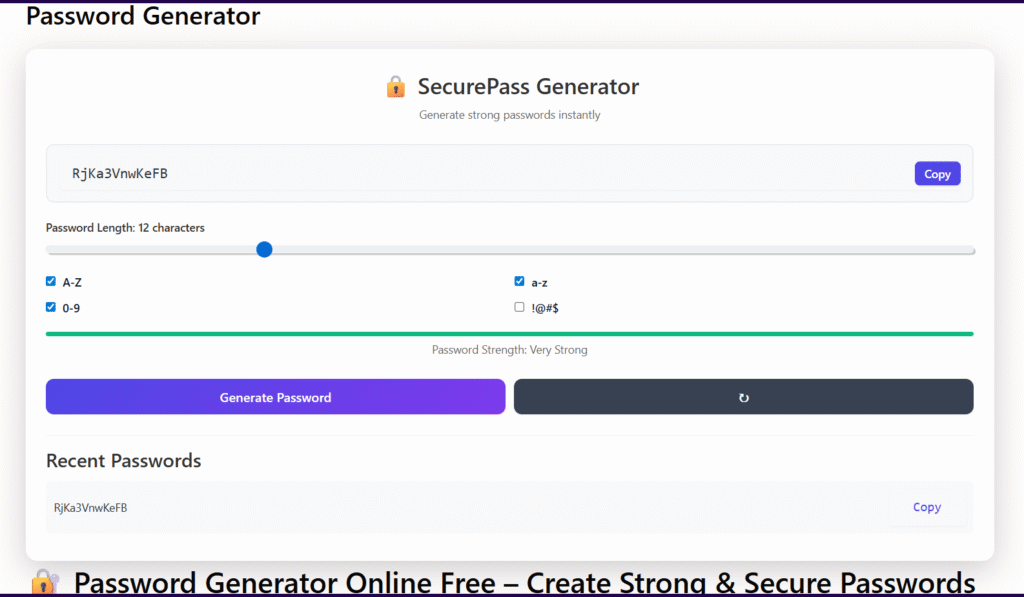
An online password generator is a tool that automatically creates random passwords for you.
Instead of inventing something yourself, the tool generates combinations of:
- Uppercase letters
- Lowercase letters
- Numbers
- Special characters
Most generators let you choose the length and complexity.
Common Types of Password Generators
There are several kinds you’ll encounter online:
- Web-based generators – Run directly in your browser
- Browser-based generators – Built into browsers like Chrome or Firefox
- Password manager generators – Part of apps like Bitwarden or 1Password
- Offline generators – Desktop or local tools that don’t need the internet
Each type has different security implications, which we’ll explore shortly.
How Secure Are Online Password Generators?
Short Answer
Some are very secure — others should be avoided.
Long Answer
Security depends on how the generator is built and where it runs.
A secure password generator relies on:
- True randomness (high entropy)
- Client-side generation (password created on your device)
- No data logging or storage
Poorly designed tools may:
- Use predictable algorithms
- Log generated passwords
- Be vulnerable to script manipulation
This is why the question are online password generators safe to use doesn’t have a single yes-or-no answer.
Understanding Password Randomness and Entropy
Password strength is measured using entropy, which represents unpredictability.
Why Entropy Matters
- Longer passwords = higher entropy
- More character types = harder to crack
- Random generation beats human creativity
For example:
Password123→ very low entropyG7#xL9!qB2$→ high entropy
Good password generators use cryptographically secure random number generators (CSPRNG) — the same standard used in banking and encryption.
Real Security Risks of Online Password Generators
While many tools are safe, there are real risks users should understand.
1. Password Logging
Some untrusted generators may store:
- Generated passwords
- IP addresses
- Browser fingerprints
This creates obvious privacy concerns.
2. JavaScript Manipulation
Web-based generators rely on JavaScript.
If a site is compromised, attackers can modify the script to:
- Generate predictable passwords
- Send copies to remote servers
3. Fake or Malicious Tools
Not all password generators are legitimate.
Some are intentionally designed to:
- Harvest credentials
- Trick users into reuse
- Appear trustworthy but lack transparency
4. Browser Extension Risks
Extensions can be powerful — but also dangerous.
If poorly reviewed or abandoned, they may:
- Request unnecessary permissions
- Collect browsing data
- Become hijacked through updates
Are Online Password Generators Better Than Human-Created Passwords?
In almost all cases, yes.
Why Humans Create Weak Passwords
People naturally:
- Reuse old passwords
- Follow predictable patterns
- Prefer short, memorable words
Hackers know this and exploit it.
Why Generators Win
Generated passwords are:
- Truly random
- Longer by default
- Harder to guess or brute-force
So even if you wonder are online password generators safe to use, they are still far safer than manual password creation when used correctly.
Which Password Generators Are the Most Secure?
Not all generators are equal. Some clearly stand out.
Safest Options
- Open-source generators (code can be audited)
- Offline generators (no internet exposure)
- Reputable password managers
Trusted password managers often include built-in generators that work locally and encrypt everything.
What to Look For in a Secure Generator
Before using any tool, check if it offers:
- Client-side password creation
- Clear privacy policy
- No account requirement
- Open-source or transparent development
These signs significantly reduce risk.
Online Password Generators vs Password Managers
People often confuse these two tools.
Key Differences
Password Generator Only:
- Creates passwords
- Does not store them
- Requires manual saving
Password Manager:
- Generates passwords
- Stores them securely
- Autofills login forms
Which One Is Better?
For most users, password managers are safer because:
- Passwords are encrypted
- You avoid reuse
- Human error is minimized
Generators alone are still useful, especially for one-time or offline use.
How to Safely Use an Online Password Generator
Follow these simple rules to stay safe 👇
Best Practices Checklist
- Use generators on HTTPS websites
- Prefer well-known or open-source tools
- Avoid generators that require login
- Never reuse generated passwords
- Enable two-factor authentication (2FA)
- Store passwords securely
You can now apply these steps to improve your password security safely and efficiently.
Expert Tips to Maximize Password Security
Here are a few extra tips that go beyond generators.
Ideal Password Length
- Minimum: 12 characters
- Recommended: 16–20 characters
Length matters more than complexity.
Consider Passphrases
Passphrases combine words randomly, such as:
river-battery-cloud-orange
They’re easier to remember and still very secure when long enough.
Password Rotation
Change passwords:
- After a known breach
- If reuse occurred
- When security is compromised
Frequent unnecessary changes are no longer recommended.
Frequently Asked Questions (FAQs)
Are free online password generators safe?
Yes, many are safe, but only when they generate passwords locally and don’t store data. Always check privacy policies and avoid unknown tools.
Can online password generators be hacked?
The generator itself can’t be “hacked,” but poorly secured websites or scripts can be modified. Using trusted tools greatly reduces this risk.
Should I trust browser-based password generators?
Built-in browser generators from major browsers are generally safe, but dedicated password managers offer better long-term security.
Is using the same generator repeatedly risky?
No, as long as the generator uses proper randomness and doesn’t log data. Reusing passwords is the real risk, not the generator.
What is the safest way to generate passwords offline?
Using an offline password manager or open-source local generator is the safest option since no internet connection is involved.
Final Verdict: Should You Use Online Password Generators?
So, are online password generators safe to use?
Yes — when chosen wisely and used correctly.
They are far more secure than human-created passwords and play an important role in modern cybersecurity.
The key is avoiding unknown tools and following basic safety practices.
When paired with good storage habits and two-factor authentication, password generators significantly reduce your risk online.
About the Author
This article was written by a digital content specialist with experience in image optimization, file formats, and document workflows. The goal is to provide practical, accurate guidance for everyday users.
Disclaimer
This guide is for educational purposes only. Tool availability and features may change over time.