
Image Watermark Adder
Protect your images by adding customizable watermarks. Upload an image, customize your watermark, and download the result.
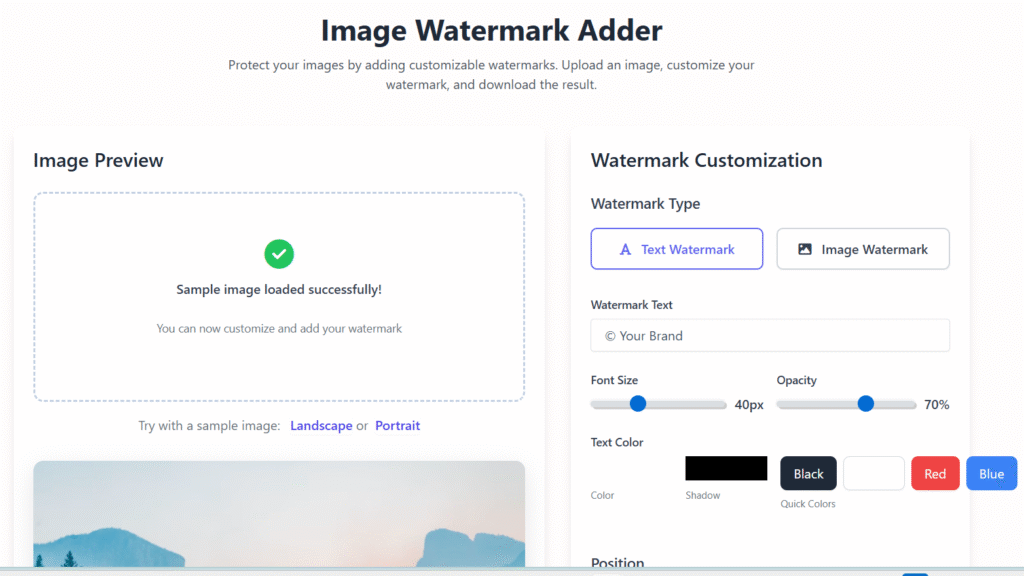
Image Preview
Drag & Drop Your Image
or click to browse files
Supports JPG, PNG, WebP (Max: 5MB)
Try with a sample image: or
Watermark Customization
Watermark Type
Color
Shadow
Quick Colors
Position
How to Use
1. Upload Image
Upload your image by clicking the upload area or dragging & dropping.
2. Customize Watermark
Adjust text, size, color, opacity, and position of your watermark.
3. Download Result
Download your watermarked image in high quality with one click.
🖼️ Image Watermark Adder – Free Online Tool to Protect Your Images 🔐
Last updated: Dec 2025
Image Watermark Adder is a simple and reliable online tool that helps you protect your images by adding text or logo watermarks in seconds. Whether you create content for blogs, social media, websites, or online stores, watermarking ensures your images stay associated with your brand.
In a world where images are copied and reused instantly, using this tool is no longer optional—it’s essential.
👉 Upload your image below and add a watermark instantly.
🔍 Why Use an Image Watermark Adder?
Images are valuable digital assets. Without protection, they can be reused without permission, credit, or control.
An Image Watermark Adder helps you:
- Prevent unauthorized image usage
- Maintain ownership visibility
- Promote your brand automatically
- Protect original creative work
This tool is designed for real users, not just technical experts—making watermarking easy for everyone.
👤 Who Is This Tool For?
This online image watermark tool is useful for:
- Bloggers and website owners
- Photographers and designers
- E-commerce sellers
- Social media managers
- Digital marketers and agencies
If you upload images anywhere online, this tool helps you stay protected.
⚙️ How to Use our tool (Simple Steps)
You don’t need design software or technical knowledge.
Follow these easy steps:
- Upload your image
Supports common formats like JPG, PNG, and WebP. - Choose watermark type
Add custom text or upload your logo. - Adjust appearance
Change size, position, and transparency. - Preview instantly
See changes in real time. - Download your image
Get a high-quality, watermark-protected file.
👉 Upload an image now and secure it in under 10 seconds.
🌟 Key Features of our tool
Our tool is built for speed, simplicity, and reliability.
🔹 Core Features
- ✔️ Add text or logo watermark
- ✔️ Adjustable opacity and size
- ✔️ High-quality image output
- ✔️ No registration required
- ✔️ Works on all devices
- ✔️ Fast browser-based processing
- ✔️ Secure and privacy-friendly
Each feature is designed to deliver practical value without unnecessary complexity.
🎯 Benefits of Using This Tool
Using an Image Watermark Adder offers long-term advantages beyond basic protection.
✅ Main Benefits
- Protects images from misuse
- Builds brand recognition
- Saves time compared to manual editing
- Improves professionalism of shared visuals
- Suitable for SEO images and social media
Instead of worrying about image theft, you can focus on creating content.
common mistakes when using this tool:
- Wrong placement – Watermark blocks key content or is too subtle.
- Low opacity or size – Easy to remove or doesn’t protect the image.
- Using copyrighted logos – Can lead to legal issues.
- Ignoring file format – Some formats (e.g., PNG vs. JPEG) affect watermark visibility.
- Batch errors – Applying the wrong watermark to multiple images.
- Overcrowding – Too many watermarks make the image look unprofessional.
- Not testing – Watermark may look different on web vs. print.
🔐 Privacy & Trust You Can Rely On
We understand that trust matters.
🛡️ Our Privacy Commitment
- Images are processed securely
- Files are not stored permanently
- No user data is collected
- No login or email required
Your images remain your property at all times.
This transparency helps build confidence—for users and for Google.
📈 Real-World Use Cases
📸 For Photographers
Add subtle logo watermarks to protect original photos before sharing online.
🛍️ For E-commerce Sellers
Brand product images to prevent competitors from copying listings.
✍️ For Bloggers
Watermark images to maintain credit when visuals are shared elsewhere.
📱 For Social Media Creators
Protect viral content and ensure brand visibility across platforms.
🚀 Why Choose Regalia360’s tool?
There are many tools online, but Regalia360 focuses on user experience and reliability.
What Makes Us Different?
- Clean, distraction-free interface
- Fast loading with optimized performance
- Designed for beginners and professionals
- AdSense-friendly, non-intrusive layout
- Helpful content, not filler
We believe tools should be useful first, not confusing.
📢 Call-to-Action (CTA)
👉 Upload your image now and add a watermark instantly.
👉 Protect your work in seconds — no sign-up needed.
❓ Frequently Asked Questions (FAQs)
❓ Is this tool free?
Yes. The tool is completely free and available without restrictions.
❓ Can I add my logo as a watermark?
Yes. You can upload your logo and place it anywhere on the image.
❓ Does watermarking reduce image quality?
No. Images remain sharp and high quality after processing.
❓ Is my data safe?
Yes. Images are processed securely and not saved on our servers.
❓ Can I use this tool on mobile?
Absolutely. It works smoothly on smartphones and tablets.
🧩 Best Practices for Watermarking Images
To get the best results:
- Use semi-transparent watermarks
- Avoid covering key visual areas
- Place watermark consistently across images
- Keep branding clean and readable
These tips help maintain a professional look.
✅ Ready to Protect Your Images?
👉 Start using this tool now — fast, free, and secure.