
Excel to PDF Converter
Convert your Excel spreadsheets to PDF files quickly and easily. All processing happens locally in your browser.
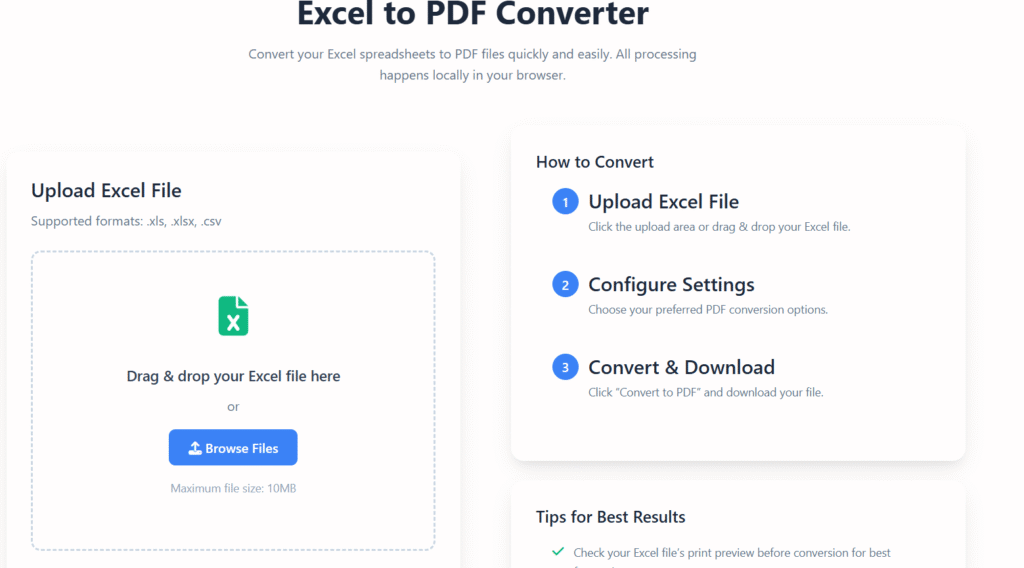
Upload Excel File
Supported formats: .xls, .xlsx, .csv
Drag & drop your Excel file here
or
Maximum file size: 10MB
Conversion Options
Converting to PDF…
0%
Conversion Complete
Your Excel file has been successfully converted to PDF. You can download it now or start a new conversion.
Secure & Private
All conversions happen locally in your browser. No files are uploaded to any server.
Fast Processing
Convert Excel files to PDF in seconds with our optimized conversion engine.
Works Everywhere
Use on any device – desktop, tablet, or mobile. No installation required.
Excel to PDF Online Free – Convert Spreadsheets in 3 Easy Steps
Last updated: Dec 2025
Excel to PDF online free is a simple and reliable way to convert Excel spreadsheets into professional PDF documents without losing formatting. At Regalia360, we’ve built this tool for users who want fast results, clean output, and complete peace of mind.
Whether you’re working with financial reports, invoices, academic data, or business records, converting Excel to PDF ensures your files look consistent and professional across all devices.
👉 Upload your Excel file below and convert it to PDF instantly.
Why Use an Excel to PDF Online Free Tool?
Excel files are powerful, but they’re not always ideal for sharing. Different devices, software versions, or accidental edits can change how your spreadsheet looks.
Converting Excel to PDF solves these problems.
Key reasons users choose Excel to PDF conversion:
- PDFs preserve formatting on all devices
- Prevent unwanted edits to sensitive data
- Ideal for sharing reports, invoices, and records
- More professional and presentation-ready
- Easy to print and archive
With our Excel to PDF online free converter, you don’t need to install software or create an account. Everything works directly in your browser.
How to Convert this tool (Step-by-Step)
Our tool is designed to be simple enough for beginners and powerful enough for professionals.
🧩 Step 1: Upload Your Excel File
Select your .xls or .xlsx file from your device. Large and complex spreadsheets are supported.
⚙️ Step 2: Convert Excel to PDF
Click the convert button. The file is processed securely using optimized servers.
📥 Step 3: Download Your PDF
Download your high-quality PDF instantly. Formatting, tables, and charts remain intact.
👉 Upload your Excel file now and get a ready-to-share PDF in seconds.
Key Features
Our Excel to PDF tool focuses on accuracy, security, and ease of use.
⭐ Core Features:
- High-quality conversion
Keeps fonts, layouts, charts, and tables exactly as in Excel. - Fast processing speed
Convert files in seconds, even with large spreadsheets. - No watermark
Your PDFs stay clean and professional. - Secure file handling
Files are encrypted and deleted automatically. - Works on all devices
Compatible with desktop, tablet, and mobile browsers. - No installation required
Entirely browser-based for convenience.
These features make Regalia360’s free tool ideal for daily work and professional use.
Real-World Use Cases
This tool is used by thousands of people for different purposes every day.
📊 Business & Finance
- Convert financial reports to PDF
- Share budgets and forecasts securely
- Send invoices in a non-editable format
🎓 Education
- Submit assignments in PDF format
- Convert research data into readable documents
- Share academic reports easily
🧾 Administration & HR
- Store employee records securely
- Convert attendance sheets to PDF
- Archive official documents
💼 Freelancers & Remote Workers
- Send proposals and pricing sheets
- Share client data safely
- Maintain professional documentation
No matter your role, Excel to PDF online free conversion helps you work smarter and more efficiently.
when NOT to use Excel to PDF
- When data needs to be edited later – PDFs are not easily editable.
- For large or interactive datasets – Filters, formulas, and pivot tables won’t work.
- When accessibility is required – PDFs may lose accessibility features.
- For data exchange or integration – PDFs aren’t machine-friendly.
- When frequent updates are needed – Re-exporting is inefficient.
- If layout depends on screen size – PDFs are fixed-layout.
Why Choose Regalia360?
There are many Excel to PDF tools, but not all are built with users in mind.
What makes Regalia360 different:
- Built for real-world document workflows
- Focus on privacy and user trust
- Clean interface without distractions
- Designed for speed and reliability
- No forced sign-ups or hidden fees
We believe tools should be helpful, transparent, and accessible — not confusing or cluttered.
Trust, Privacy & Security 🔒
Your files matter. That’s why privacy is a top priority.
Our security standards:
- Files are transferred using encrypted connections
- No manual access to uploaded documents
- Automatic file deletion after conversion
- No data sharing with third parties
You stay in control of your documents at all times.
Excel to PDF vs Sharing Excel Files
| Feature | Excel File | PDF File |
|---|---|---|
| Editable | Yes | No |
| Formatting consistency | ❌ | ✅ |
| Professional presentation | ❌ | ✅ |
| Secure sharing | ❌ | ✅ |
| Printing quality | ⚠️ | ✅ |
Converting Excel to PDF online free ensures your data looks the same everywhere.
Benefits of Using our tool
Using our tool saves time and avoids common file-sharing issues.
✔ Main Benefits:
- No formatting issues across devices
- Reduced risk of accidental edits
- Easy sharing with clients or teams
- Professional-looking documents
- Completely free to use
These benefits make Excel to PDF conversion a smart choice for everyday tasks.
Tips for Best Results
To get the best output, consider these tips:
- Check page layout and margins in Excel
- Remove unnecessary empty rows or columns
- Ensure charts fit within the page width
- Use clear fonts for readability
Small adjustments in Excel can lead to cleaner PDFs.
Frequently Asked Questions (FAQs)
❓ Is this Excel to PDF tool really free?
Yes. Our Excel to PDF online free tool has no hidden charges and no watermark.
❓ Will my Excel formatting change after conversion?
No. Tables, charts, fonts, and layouts are preserved accurately.
❓ Is it safe to upload Excel files here?
Yes. Files are encrypted and automatically deleted after processing.
❓ Can I convert large Excel files?
Yes. The tool supports large spreadsheets and complex data.
❓ Do I need to install anything?
No installation needed. Everything works directly in your browser.
Get Started Now 🚀
If you’re looking for a fast, secure, and easy way to convert spreadsheets, our tool on Regalia360 is the solution.
👉 Upload your Excel file above and convert it to PDF instantly.
No sign-up.
No watermark.
Just simple, reliable conversion.