
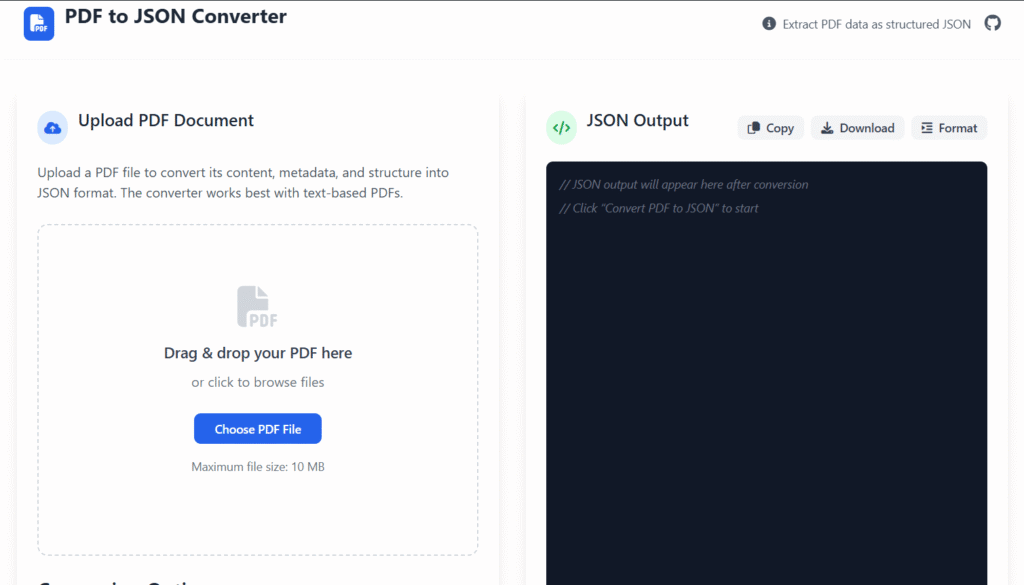
Upload PDF Document
Upload a PDF file to convert its content, metadata, and structure into JSON format. The converter works best with text-based PDFs.
Drag & drop your PDF here
or click to browse files
Maximum file size: 10 MB
example.pdf
2.4 MBConversion Options
PDF Preview
PDF preview will appear here after upload
First page will be displayed
PDF.js technology for accurate rendering
JSON Output
Conversion Statistics
Pages
0
Characters
0
JSON Size
0 KB
Time
0s
How to Use
Upload PDF
Drag and drop or click to select a PDF file from your device.
Configure Options
Choose what data to extract (text, metadata, pages, images).
Convert
Click “Convert PDF to JSON” to process your document.
Export Results
Copy, download, or format the JSON output as needed.
📄 PDF to JSON Converter Online – Fast, Secure & Developer-Ready Tool
Last updated: Dec 2025
PDF to JSON Converter is a powerful yet easy-to-use tool designed to help you transform static PDF documents into clean, structured JSON data—instantly and securely.
Whether you’re a developer working with APIs, a data analyst organizing reports, or a business owner digitizing documents, this tool makes PDF data extraction simple, accurate, and efficient.
At Regalia360, our goal is to provide practical online tools that solve real problems—without complexity, distractions, or hidden costs.
🔍 What Is a PDF to JSON Converter?
A PDF to JSON Converter extracts readable text and structured data from PDF files and converts it into JSON format.
JSON (JavaScript Object Notation) is:
- Lightweight
- Easy to read
- Widely supported across platforms
- Ideal for APIs, databases, and automation
Unlike PDFs, JSON data can be easily searched, analyzed, reused, and integrated into applications.
🤔 Why Convert PDF to JSON?
PDFs are excellent for sharing information visually—but not for processing data.
Converting PDF files into JSON allows you to:
- Reuse data programmatically
- Automate workflows
- Store information in databases
- Build APIs and dashboards
- Eliminate manual copy-paste work
This is where a reliable PDF to JSON Converter Online becomes essential.
⚙️ How to Use this tool
Getting started takes less than a minute:
- Upload your PDF file
Select a PDF from your device or drag and drop it into the tool. - Start the conversion
The system processes your file and extracts structured content. - Download your JSON file
Receive clean, readable JSON output instantly.
✅ No account required
✅ No software installation
✅ Works on desktop, tablet, and mobile
👉 Upload your PDF now and convert it to JSON in seconds!
✨ Key Features
Our tool is built for reliability and ease of use.
🚀 Fast & Efficient
- Converts PDFs in seconds
- Handles both small and large files smoothly
📊 Structured JSON Output
- Clear key-value formatting
- Suitable for APIs, databases, and scripts
🔐 Privacy-Focused
- Files are processed securely
- Automatic deletion after conversion
- No data sharing or tracking
🌐 Fully Online
- No downloads or plugins
- Works directly in your browser
👨💻 Developer-Friendly
- Clean output format
- Easy integration into workflows
🎯When NOT to Use a PDF to JSON Converter
When Offline Access is Required
If you don’t have a stable internet connection, online converters won’t work. Offline tools are more reliable in such cases.
For Highly Sensitive Documents
Avoid uploading PDFs that contain personal, financial, or confidential information. Online converters may not guarantee full data privacy.
When Precise Formatting Matters
PDFs with complex layouts, tables, or graphics may lose accuracy during conversion. JSON is better for structured text, not visual fidelity.
For Large Files
Very large PDFs can cause online converters to slow down, fail, or even time out. Consider desktop tools for heavy files.
When You Need Advanced Data Processing
Simple converters won’t extract nested data intelligently. If you need advanced parsing or custom data structures, use programming libraries like Python’s pdfplumber or PyPDF2.
For Legal or Official Submissions
JSON output is rarely accepted for official or legal purposes. Always stick to PDF or required formats for formal submissions.
🎯 Real-World Use Cases
This PDF to JSON Converter Online is used daily by professionals across industries.
👨💻 Developers
- Convert PDF reports into API-ready JSON
- Extract structured data for applications
📈 Data Analysts
- Transform PDF tables into analyzable datasets
- Reduce manual data cleanup
🏢 Businesses
- Digitize invoices, contracts, and reports
- Improve internal data workflows
🎓 Students & Researchers
- Convert academic PDFs into structured references
- Organize research data efficiently
🌟 Benefits of Using Our Tool
Using our tool offers clear advantages:
- ⏱️ Saves time and effort
- ❌ Eliminates manual data entry
- 📁 Improves data organization
- 🔄 Supports automation
- 💡 Works without technical expertise
Simply upload your file and let the tool handle the rest.
🔒 Trust, Security & Privacy
We understand that PDFs often contain sensitive information.
That’s why Regalia360 follows strict privacy practices:
- Files are processed over secure connections
- No permanent storage of uploaded documents
- Automatic file deletion after conversion
- No login or personal data required
Your data remains your data—always.
📱 Device & Browser Compatibility
The PDF to JSON Converter Online works seamlessly on:
- Windows, macOS, Linux
- Android & iOS devices
- Chrome, Edge, Firefox, Safari
No matter where you are, the tool adapts to your device.
📌 Best Practices for Accurate Results
To get the best output from this tool:
- Use text-based PDFs whenever possible
- Ensure content is selectable (not scanned images)
- Well-structured PDFs produce cleaner JSON
For scanned documents, OCR may be required before conversion.
❓ (FAQ)
❓ Is this tool free?
Yes. You can use the tool for free without creating an account.
❓ Are my files stored on your servers?
No. Files are processed temporarily and deleted automatically.
❓ Can I convert large PDF files?
Yes, the tool supports both small and large PDF documents.
❓ Does it work with tables?
Yes. Structured tables are converted into readable JSON where possible.
❓ Is this tool suitable for developers?
Absolutely. The JSON output is clean and ideal for development workflows.
📣 Call to Action
Ready to turn your PDF files into structured data?
👉 Upload your PDF now and get clean JSON output instantly!
No sign-up. No hassle. Just results.
🏁 Final Thoughts
A reliable PDF to JSON Converter Online can dramatically improve how you work with documents and data.
At Regalia360, we focus on creating tools that are:
- Simple to use
- Secure by design
- Valuable for real users
If you’re looking for a fast, trustworthy way to convert PDFs into JSON format, this tool is built for you.