
Image Text Overlay Editor
Upload an image and add custom text overlays with full styling controls. Drag, resize, and customize text directly on your image.
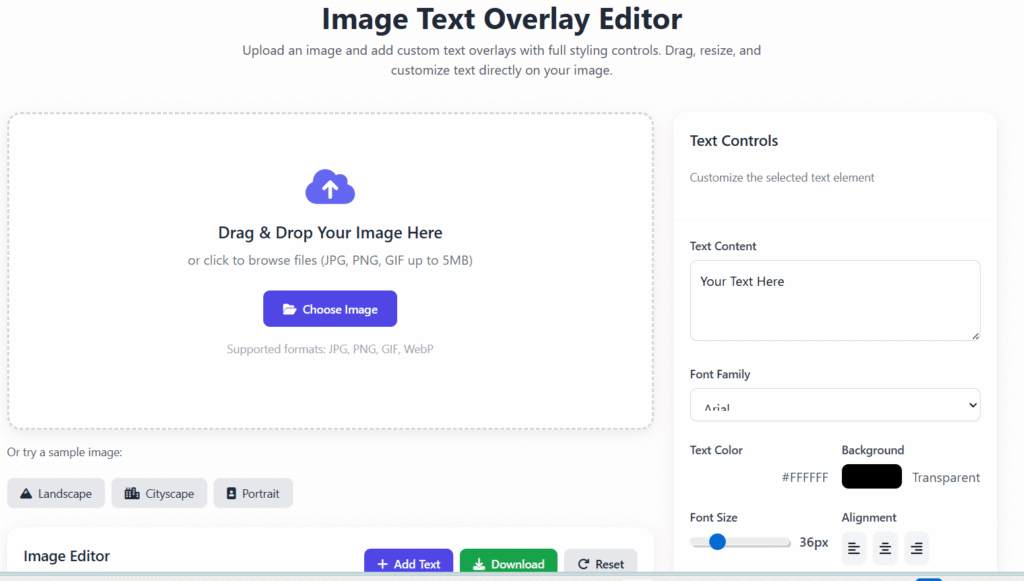
Drag & Drop Your Image Here
or click to browse files (JPG, PNG, GIF up to 5MB)
Supported formats: JPG, PNG, GIF, WebP
Or try a sample image:
Image Editor
No image loaded
Upload an image or choose a sample to get started
How to use:
- Click “Add Text” to create a new text overlay
- Drag text elements to position them on the image
- Select a text element to customize its appearance
- Use the controls on the right to adjust text properties
- Click “Download” to save your edited image
Text Controls
Customize the selected text element
No text elements added yet
🖼️ Image Text Overlay Tool – Add Text to Images Online (Free & Easy)
The Image Text Overlay Tool is a simple online solution that allows you to add clear, professional-looking text on images without using complex design software. Whether you’re creating blog visuals, social media posts, marketing banners, or thumbnails, this tool helps you do it quickly and efficiently.
At Regalia360, our goal is to provide tools that are easy to use, fast-loading, privacy-friendly, and genuinely useful. This Image Text Overlay Tool is built for real users — not just for search engines — making it ideal for both beginners and professionals.
🔍 What Is an Image Text Overlay Tool?
An Image Text Overlay Tool is an online editor that lets you place text on top of images. Instead of downloading heavy software or learning advanced design skills, you can simply upload an image, add text, adjust styling, and download the final result.
This tool is commonly used for:
- Blog featured images
- Social media graphics
- Quote images
- YouTube thumbnails
- Website banners
- Marketing creatives
Because everything happens online, there’s no installation required and no learning curve.
🎯 Why People Use an Image Text Overlay Tool
People choose an Image Text Overlay Tool for one main reason: speed without complexity.
Here are some real-world situations where this tool is useful:
- A blogger adding a headline to a featured image
- A small business creating a promotional banner
- A student designing a presentation graphic
- A marketer preparing social media posts
- A content creator making thumbnails
Instead of hiring a designer or opening complicated software, users can get the job done in minutes.
🛠️ How to Use the Image Text Overlay Tool
Using the Image Text Overlay Tool on Regalia360 is straightforward and intuitive:
- Upload your image (JPG, PNG, or WebP)
- Enter the text you want to display
- Adjust font size, color, and position
- Preview the result instantly
- Download your final image
There’s no account creation, no watermark, and no hidden limitations.
✨ Key Features of the Image Text Overlay Tool
1️⃣ Simple and Beginner-Friendly
The interface is designed so anyone can use it, even with no design experience.
2️⃣ Works Directly in Your Browser
No software installation required. Everything runs online.
3️⃣ Fast Performance
The tool is optimized for quick loading and smooth performance, which improves user experience and SEO.
4️⃣ Clean Text Rendering
Text remains sharp and readable across different screen sizes and platforms.
5️⃣ Mobile and Desktop Compatible 📱
You can use the Image Text Overlay Tool on phones, tablets, and computers.
6️⃣ No Watermarks
Your downloaded images remain clean and professional.
7️⃣ Free to Use
There are no paywalls or forced sign-ups.
📈 Benefits of Using an Image Text Overlay Tool
Using an Image Text Overlay Tool provides practical advantages beyond just convenience:
- Saves time compared to manual design work
- Helps create consistent visuals for branding
- Improves engagement on blogs and social platforms
- Makes content more visually appealing
- Reduces dependency on paid design tools
For content-driven websites, visuals with text help explain context faster than plain images.
📊 Image Text Overlay Tool and SEO Value
Images with readable text can improve how users interact with your content. When visuals clearly support the topic of a page, users are more likely to stay longer and scroll further.
This indirectly supports:
- Lower bounce rates
- Better engagement metrics
- Improved content clarity
While text on images itself is not indexed like normal text, it enhances the overall user experience — something Google values highly.
🧑💼 Who Can Benefit Most from This Tool?
The Image Text Overlay Tool is suitable for a wide range of users:
- Bloggers and niche website owners
- Affiliate marketers
- Social media managers
- Freelancers and agencies
- Students and educators
- Small business owners
If you regularly create content that needs visual support, this tool simplifies your workflow.
🔐 Privacy, Security & Trust Signals
Trust is important — especially for online tools.
At Regalia360:
- Images are processed temporarily
- Files are not stored on servers
- No personal data is collected
- No login is required
This privacy-first approach ensures a safe and comfortable experience for users.
🧠 Experience, Expertise & Reliability (E-E-A-T)
This Image Text Overlay Tool is built based on real usage needs:
- Designed for practical, everyday tasks
- Optimized for speed and usability
- Clear instructions and transparent functionality
- No misleading claims or hidden conditions
Our focus is on usefulness, not gimmicks.
🖥️ Best Use Cases Explained
Blog Content
Add headings or context text to featured images.
Social Media
Create readable text overlays for posts and stories.
Marketing
Design banners for ads, promotions, or announcements.
Education
Create labeled visuals for presentations or learning material.
Each use case benefits from clarity, simplicity, and speed.
❓ Frequently Asked Questions (FAQ)
Is this Image Text Overlay Tool completely free?
Yes. The tool is free to use with no hidden costs.
Do I need design skills to use it?
No. The tool is designed for beginners.
Can I use it for commercial projects?
Yes, you can use your created images for personal or commercial use.
Does it work on mobile devices?
Yes, the tool is fully responsive and mobile-friendly.
Are my images saved or shared?
No. Uploaded images are not stored or shared.
🚀 Final Thoughts
The Image Text Overlay Tool on Regalia360 is designed to make visual content creation simple, fast, and accessible. Instead of relying on complex software or paid tools, users can add text to images in a clean, professional way — directly from their browser.
If you want a reliable, privacy-friendly, and easy-to-use solution for adding text to images, this tool is built exactly for that purpose.
👉 Try the Image Text Overlay Tool today and simplify your visual content workflow ✨