
CSS Gradient Generator
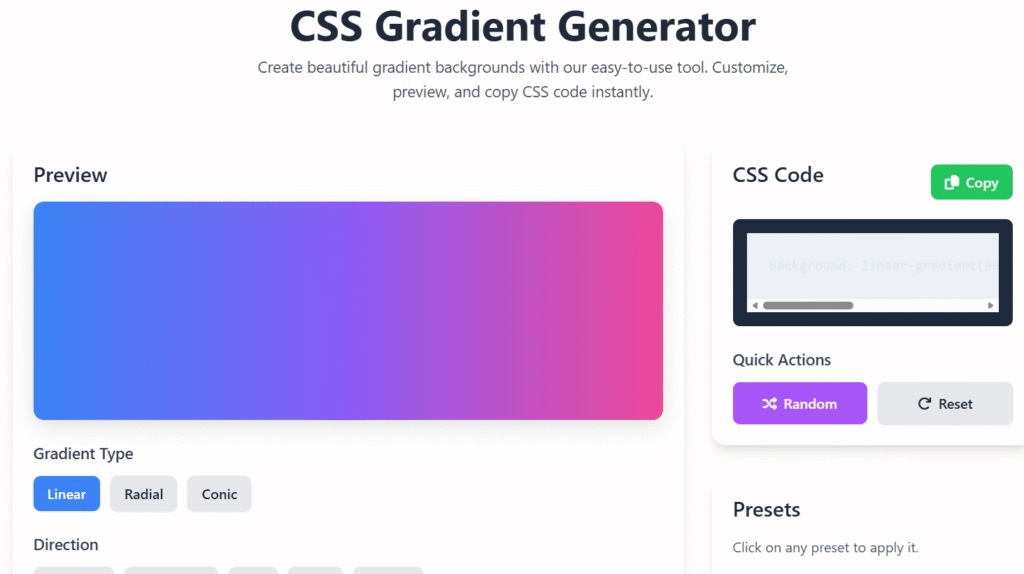
Create beautiful gradient backgrounds with our easy-to-use tool. Customize, preview, and copy CSS code instantly.
Preview
Gradient Type
Direction
Color Stops
CSS Code
background: linear-gradient(90deg, #3b82f6 0%, #8b5cf6 50%, #ec4899 100%);
Quick Actions
Presets
Click on any preset to apply it.
How to Use
- Click on color stops to change their color
- Drag color stops to adjust position
- Add more color stops for complex gradients
- Copy the CSS code to use in your projects
Select Color
🖌️CSS Gradient Generator – Create Stunning CSS Gradients Instantly 🎨
Last updated: Dec 2025
CSS Gradient Generator is a free online tool designed to help developers, designers, and beginners create beautiful gradient backgrounds for websites, apps, and landing pages. With just a few clicks, you can generate linear, radial, or multi-color gradients and get ready-to-use CSS code.
Whether you’re a professional web developer or a beginner exploring web design, this tool is perfect for creating stunning visual effects that make your website stand out.
🔹 Why Use a CSS Gradient Generator?
Creating gradients manually in CSS can be time-consuming and prone to errors. A CSS Gradient Generator simplifies this process and offers:
- ⚡ Fast, real-time previews
- 🎨 Easy color selection
- 📄 Clean, copy-paste CSS code
- 🌐 Browser-compatible gradients
- 🧑💻 Beginner-friendly interface
Gradients can significantly enhance your website’s look, improve user engagement, and make pages feel more modern and professional.
🏷 Features of Ourtool
Our tool is packed with features that make designing gradients simple, fun, and effective:
- ✅ Free Online Tool – No login or subscription required
- ✅ Linear & Radial Gradients – Create smooth transitions between two or more colors
- ✅ Live Preview – See your gradient instantly as you edit
- ✅ Multiple Color Stops – Add multiple colors for complex gradient effects
- ✅ Adjustable Angles – Set custom angles for linear gradients (0°–360°)
- ✅ Responsive Design – Works perfectly on desktops, tablets, and mobiles
- ✅ Clean CSS Code – Copy and paste directly into your website
- ✅ AdSense-Friendly Layout – Designed to show ads without disrupting user experience
- ✅ Privacy-Safe – No personal data collection required
CTA: Paste your colors below and see your gradient live instantly! 🚀
🔹 How to Use the CSS Gradient Generator
Our tool for websites is designed for simplicity. Here’s a step-by-step guide:
- Select Gradient Type
Choose linear or radial gradient style based on your design needs. - Pick Your Colors
Use the color picker or enter hex codes for multiple colors. - Adjust Direction & Angle
Customize the gradient direction for linear gradients or center position for radial gradients. - Preview Your Gradient
Watch the gradient update in real-time to ensure it looks perfect. - Copy CSS Code
Click the copy button to get clean CSS code ready for your website. - Paste into Your Website
Use it in CSS files, inline styles, or frameworks like Bootstrap or Tailwind CSS. - Publish Your Design 🚀
Apply it confidently knowing your gradient is responsive and browser-compatible.
Tip: Experiment with multiple colors and opacity to create unique, professional-grade gradients.
🔹 Benefits of Using our tool
Using our tool brings real value to developers, designers, and website owners:
- 💡 Saves Time – No need to manually write CSS code
- 🎨 Professional Look – Make your website visually appealing
- ⚡ Boosts Engagement – Attractive gradients keep users on your site longer
- 📱 Responsive Ready – Works seamlessly across devices
- 🧑💻 Beginner-Friendly – No coding skills needed
- 🚀 SEO-Friendly – Fast-loading gradients improve user experience
- 🔒 Privacy & Safety – No personal data collection
- 💻 Supports AdSense – Optimized for ad placements without affecting UX
CTA: Start creating your gradient now! Copy and paste your gradient in seconds.
🌈 Types of Gradients You Can Create
Our CSS Gradient Generator supports multiple gradient types:
1. Linear Gradients
Smooth transitions from one color to another in a straight line. You can adjust the angle to create diagonal, vertical, or horizontal gradients.
2. Radial Gradients
Circular gradients that spread from a center point. Perfect for hero sections, buttons, and backgrounds.
3. Multi-Color Gradients
Combine 3 or more colors for eye-catching effects. Ideal for modern web design trends.
4. Custom Gradients
Adjust opacity, add multiple stops, and tweak positions for unique designs.
🔹 Why Choose Regalia360’s tool?
At Regalia360.com, our tool is built with real user needs in mind:
- 🏆 Optimized for Modern Browsers – Works on Chrome, Firefox, Safari, Edge
- 🔍 Fast & Lightweight – Pages load quickly for better SEO and user experience
- 📚 Trusted & Reliable – Clean code output every time
- 🌍 Global Access – Fully responsive for India, USA, and worldwide audiences
- 🛡 Safe & Private – No logins, tracking, or data collection
CTA: Try our tool now and create a gradient in under a minute!
common mistakes when using a CSS Gradient Generator
- Overusing colors – Too many color stops make gradients look messy.
- Poor contrast – Text becomes hard to read over gradients.
- Ignoring browser support – Some older browsers may not fully support certain gradient syntax.
- Forgetting fallback colors – Always include a solid background color as a backup.
- Incorrect angle or direction – Leads to unexpected gradient flow.
- Not testing responsiveness – Gradients may look different on various screen sizes.
- Using gradients everywhere – Overuse can hurt UI consistency and readability.
💡 Use Cases for this
Gradients are versatile and can be used in many ways:
- 🌐 Website backgrounds
- 📱 Mobile app UIs
- 🛍 Landing page hero sections
- 🧾 Banners & call-to-action areas
- 🎨 Buttons and cards
- 🧑💻 Front-end projects
❓ FAQs
Q1: Is this tool free?
✅ Yes, it’s completely free with unlimited usage.
Q2: Can I use the gradients commercially?
Absolutely! You can use them in personal or commercial projects.
Q3: Does it support all modern browsers?
Yes, it works perfectly on Chrome, Firefox, Safari, Edge, and mobile browsers.
Q4: Do I need coding skills to use this tool?
No coding knowledge is required. The interface is beginner-friendly.
Q5: Can I copy the CSS code easily?
Yes, copy the clean CSS code with a single click.
Q6: Is the tool AdSense-friendly?
Yes, the design supports ads without affecting user experience or page load speed.
🌟 Tips to Maximize Your Gradients
- Mix light and dark colors for better contrast
- Use opacity to blend gradients smoothly
- Experiment with angles for dynamic layouts
- Combine with shadows and overlays for a professional effect
- Always preview gradients on mobile and desktop
🔹 Call to Action
Ready to create your perfect CSS gradient?
Paste your colors below, preview your gradient instantly, and copy clean CSS code to your website. 🌈
✅ Try it Now – It’s fast, free, and beginner-friendly!