
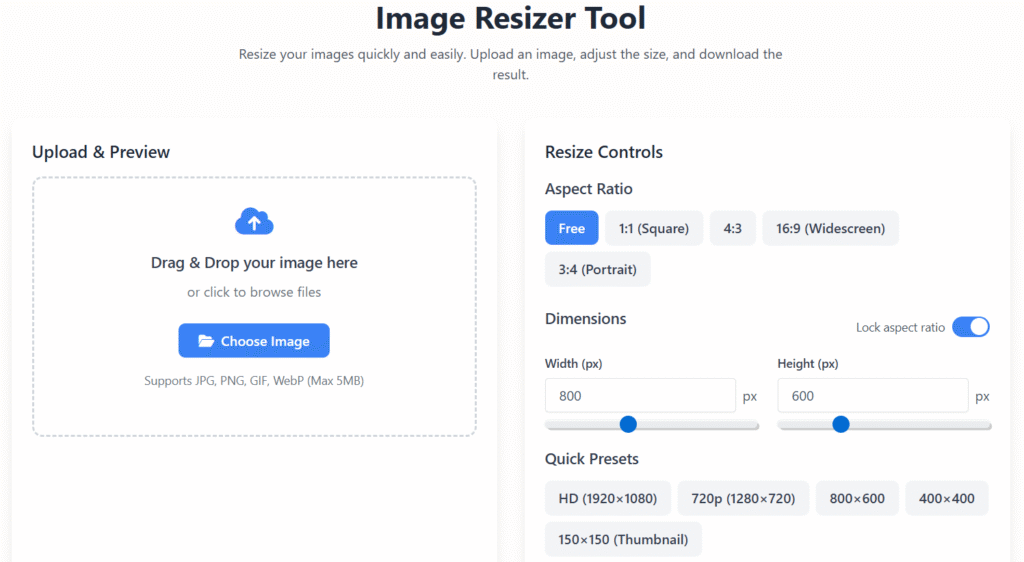
Image Resizer Tool
Resize your images quickly and easily. Upload an image, adjust the size, and download the result.
Upload & Preview
Drag & Drop your image here
or click to browse files
Supports JPG, PNG, GIF, WebP (Max 5MB)
Preview
Resize Controls
Aspect Ratio
Dimensions
Quick Presets
The image will be downloaded as a PNG file
How to Use
1. Upload Image
Click the upload area or drag and drop your image file.
2. Adjust Size
Use sliders, input fields, or preset buttons to set your desired dimensions.
3. Download
Click the download button to save your resized image.
Image Resizer Online – Resize Images Instantly & Safely (2025 Guide)
Last updated: Dec 2025
Image Resizer Online is a simple, fast, and reliable tool that helps you resize images to the exact dimensions you need — without installing software, without losing quality, and without risking your privacy.
Whether you are managing a website, uploading product images, preparing social media posts, or improving page speed for SEO, this Image Resizer Online tool on regalia360.com is designed to solve a real, everyday problem efficiently and responsibly 📸⚡
In today’s web environment, image optimization is not optional — it directly affects loading speed, user experience, search rankings, and even ad revenue. That’s why this tool focuses on practical value, trust, and ease of use, not gimmicks.
What Is an Image Resizer ?
An Image Resizer is a browser-based utility that allows users to change image dimensions (width and height) directly from their device. Unlike traditional software, online image resizing tools work instantly without downloads or complicated settings.
Our Image Resizer Online is built for people who want results quickly:
- Upload an image
- Adjust the size
- Download the optimized version
That’s it — no learning curve, no technical barriers.
Why Image Size Matters More Than Ever
Images play a major role in how users and search engines perceive your content. Oversized images can create several issues:
- Slow website loading speed
- Poor mobile performance
- Higher bounce rates
- Lower SEO rankings
- Reduced AdSense earnings
Using an Image Resizer Online helps solve all of these problems by ensuring your images are optimized for their purpose without unnecessary file weight.
Who Should Use This tool?
This tool is designed for real users with real needs, including:
👩💻 Website Owners & Bloggers
Resize images to improve page speed, Core Web Vitals, and SEO performance.
🛍️ eCommerce Sellers
Prepare product images that load faster and meet platform size requirements.
📱 Social Media Managers
Resize images for Instagram, Facebook, YouTube thumbnails, LinkedIn, and more.
🎓 Students & Educators
Adjust image sizes for assignments, presentations, and documents.
🎨 Designers & Creators
Quickly resize visuals without opening heavy design software.
Key Features of our tool :
Our Image Resizer Online focuses on simplicity, performance, and trust:
- ✔ Resize images instantly in your browser
- ✔ Maintain original image quality
- ✔ Supports common formats (JPG, PNG, WEBP)
- ✔ No account or registration required
- ✔ Works on desktop, tablet, and mobile
- ✔ Secure, privacy-friendly processing
- ✔ Clean, distraction-free interface
- ✔ Optimized for speed and usability
Each feature exists to improve user experience — not to inflate word count or complexity.
common mistakes when using an image resizer
- Upscaling images → Causes blur and loss of quality
- Ignoring aspect ratio → Leads to stretched or squished images
- Over-compressing → Results in pixelation and artifacts
- Using wrong file format → e.g., JPEG for logos instead of PNG/SVG
- Not checking final resolution → Poor display on different screens
- Resizing multiple times → Degrades image quality each time
- Forgetting color profile issues → Colors may look off on other devices
How to Use this tool (Step-by-Step)
Using Image Resizer Online is intentionally straightforward:
- Upload your image from your device
- Enter the desired width and height
- Lock the aspect ratio if needed
- Click the resize button
- Download the resized image instantly
There are no hidden steps, watermarks, or forced sign-ups.
Image Quality & Performance Explained
One of the most common concerns users have is image quality. Our Image Resizer is designed to balance visual clarity with file size efficiency.
What this means:
- Images remain sharp and clear
- No unnecessary compression artifacts
- Optimized for web, not distortion
This makes it ideal for websites where both speed and appearance matter.
Privacy & Data Safety You Can Trust 🔒
Trust is essential for any online tool.
This tool operates entirely within your browser:
- Images are not uploaded to servers
- No image data is stored or tracked
- No personal information is collected
This privacy-first approach makes the tool safe for sensitive images and professional use.
SEO Benefits of Using this tool
Properly resized images contribute directly to better SEO outcomes:
- Faster page load times
- Improved mobile performance
- Better Core Web Vitals scores
- Reduced bounce rates
- Enhanced user engagement
Search engines reward websites that provide fast, smooth experiences — image optimization plays a key role in this.
this tool for AdSense Optimization
From an AdSense perspective, optimized images help:
- Improve page speed (important for ad loading)
- Increase user session duration
- Reduce layout shifts
- Create a cleaner, more readable page
This tool supports monetization by improving overall site quality — exactly what AdSense reviewers want to see.
Why Choose this tool on Regalia360?
There are many tools online, but few focus on long-term usefulness and trust.
At regalia360.com, we prioritize:
- Clear purpose
- Honest functionality
- User-first design
- Reliable performance
- Educational value
Our tool is part of a growing ecosystem of practical tools designed to help users solve every day digital problems efficiently.
Accessibility & User Experience
This tool is designed with accessibility and usability in mind:
- Works smoothly on all modern browsers
- Mobile-friendly layout
- Minimal distractions
- Fast interaction feedback
A good tool should never confuse or overwhelm the user — this one doesn’t.
Frequently Asked Questions (FAQs)
Is this tool completely free?
Yes. This tol is free to use with no hidden fees or limitations.
Do I need to create an account?
No account or login is required. Just upload and resize.
Will my image quality be reduced?
No. The tool maintains visual quality while resizing dimensions.
Can I use this tool on mobile?
Yes. The Image Resizer works smoothly on mobile devices and tablets.
Are my images stored anywhere?
No. All processing happens locally in your browser, ensuring privacy.
Can I resize images for social media?
Yes. This tool is ideal for resizing images for various platforms and use cases.
Final Thoughts
If you’re looking for a safe, fast, and genuinely useful Image Resizer, this tool on regalia360.com is built for you.
It focuses on:
- Real problems
- Real users
- Real performance
No exaggeration, no clutter — just a practical tool designed to improve your workflow and your website’s quality.
👉 Use our tool today and resize images with confidence 🖼️✨