
PDF to JPG Converter
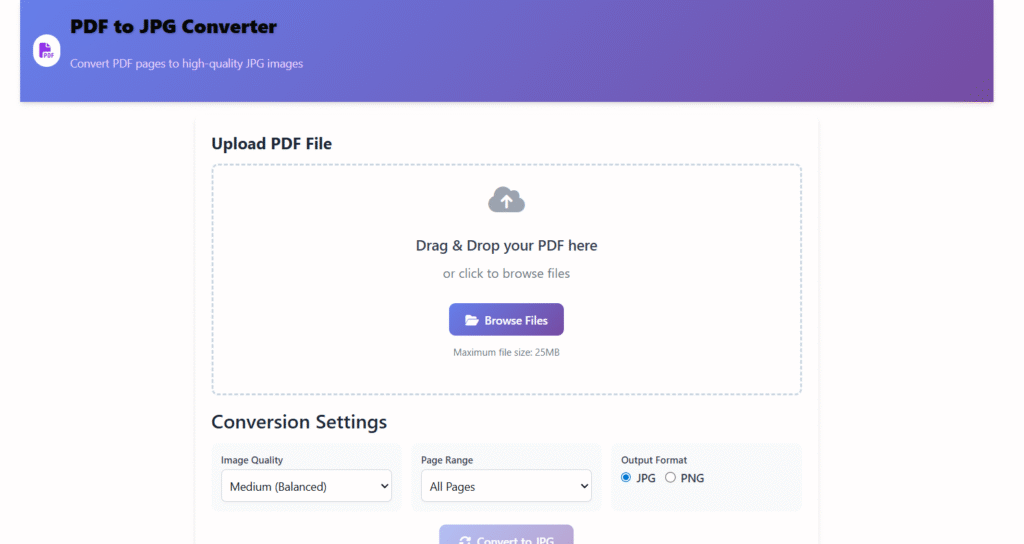
Convert PDF pages to high-quality JPG images
Upload PDF File
Drag & Drop your PDF here
or click to browse files
Maximum file size: 25MB
example.pdf
2.4 MB • 5 pages
Conversion Settings
Conversion happens locally in your browser
📄 Converter Online Free – Fast, Secure & High-Quality
Last updated: Dec 2025
PDF to JPG converter online free is the easiest way to turn PDF documents into image files you can view, upload, or share anywhere. Whether you’re working with documents, assignments, designs, or scanned files, converting PDF pages into JPG images makes them more flexible and accessible.
At Regalia360, we’ve built a reliable PDF to JPG tool that focuses on quality, speed, and privacy — without watermarks, forced signups, or confusing steps.
👉 Upload your PDF and convert it to JPG instantly.
🔍 What Is a PDF to JPG Converter?
A PDF to JPG converter is an online tool that transforms each page of a PDF file into a separate JPG image.
This is useful when:
- A website only accepts image uploads
- You want to share one page instead of the full PDF
- You need preview images or thumbnails
- You’re working on designs or presentations
JPG images are widely supported across all devices, making them easier to open, edit, and upload than PDFs.
🎯 Why Use a PDF to JPG Converter Online Free?
Using an online PDF to JPG converter saves time and avoids installing heavy software.
Key Advantages:
- Works directly in your browser
- No downloads or setup required
- Accessible on mobile and desktop
- Faster than offline tools
Our tool is designed for real-world use cases, not just technical conversions.
🛠️ How to Use the PDF to JPG Converter (Step-by-Step)
Converting your PDF to JPG images on Regalia360 is simple and beginner-friendly.
✅ Follow These Steps:
- Click the Upload PDF button
- Select a PDF file from your device
- Wait while each page is processed
- Download your JPG images instantly
📌 No registration
📌 No watermark
📌 No email required
👉 Upload your PDF now and get high-quality JPG images in seconds!
⭐ Key Features of our Tool
Our PDF to JPG converter online free is built to deliver accuracy and performance.
🔹 Core Features:
- High-resolution JPG output
- Converts multi-page PDFs accurately
- Fast cloud-based processing
- Simple and clean interface
- Works on all modern browsers
- Supports mobile and desktop devices
Each conversion is optimized to preserve:
- Text clarity
- Image sharpness
- Original layout
⚠️ Common Mistakes When Using a PDF to JPG Converter
Even the best tools can be misused if you’re not careful. Avoid these common mistakes to get the highest quality JPG images every time:
1️⃣ Uploading Low-Quality PDFs
- Low-resolution PDFs lead to blurry or pixelated JPG images.
- Always start with a clear, high-quality PDF for crisp results.
2️⃣ Converting Huge Files All at Once
- Very large PDFs can slow down conversion or even cause errors.
- Split big files into smaller chunks for faster and smoother processing.
3️⃣ Ignoring Page Selection
- Converting unnecessary pages wastes time and increases file size.
- Select only the pages you need before converting.
4️⃣ Using Untrusted Tools
- Some online converters don’t protect your data.
- Always choose a secure and privacy-focused tool like Regalia360, where files are deleted automatically.
5️⃣ Forgetting Mobile Compatibility
- Not all converters work well on phones or tablets.
- Use mobile-friendly tools to convert PDFs on the go without frustration.
6️⃣ Overlooking Image Orientation
- Pages may appear rotated or flipped after conversion.
- Preview the output to ensure correct orientation.
7️⃣ Expecting Editable Text in JPG
- JPG images are static; you cannot edit text directly.
- If you need editable content, consider using OCR tools alongside your converter.
✅ Quick Tip
Always review your JPG images before sharing or uploading. Using Regalia360 PDF to JPG converter online free helps avoid these mistakes — it’s fast, secure, and accurate.
🎁 Benefits
Using JPG images instead of PDFs offers multiple practical benefits.
🟢 User Benefits:
- Easy uploads on websites and forms
- Faster sharing on messaging apps
- Better compatibility across platforms
- Useful for previews and thumbnails
- Ideal for editing and annotations
If you frequently deal with documents, this PDF to JPG converter online free can significantly simplify your workflow.
👥 Who Should Use This Tool?
This tool is helpful for a wide range of users.
👨🎓 Students & Teachers
- Convert assignments and notes
- Upload images for online submissions
🧑💼 Office Professionals
- Share specific pages with clients
- Upload documents to portals
🎨 Designers & Creators
- Extract visuals from PDF files
- Use pages in presentations or designs
🌐 Website Owners & Bloggers
- Create image previews
- Improve page load speed
🔐 Privacy, Security & Trust (E-E-A-T Signals)
We understand that document privacy matters.
🔒 How We Protect Your Files:
- Files are processed securely
- No permanent file storage
- Automatic deletion after conversion
- No third-party sharing
Your files remain private and confidential at all times.
⚡ Performance & User Experience
Regalia360 focuses on speed and usability.
🚀 Performance Highlights:
- Fast loading pages
- Optimized conversion engine
- No distracting popups
- Mobile-responsive layout
This ensures a smooth experience, even on slower devices.
📈 SEO & Accessibility Advantages of JPG Images
Converting PDF files into JPG images can also help with SEO and accessibility.
🌐 SEO Benefits:
- JPG images load faster
- Easier image compression
- ALT text improves visibility
- Better compatibility with CMS platforms
This makes JPG images ideal for web use.
🔄 Common Use Cases for PDF to JPG Conversion
Here are some real-world scenarios where this tool is useful:
- Uploading scanned documents
- Sharing single PDF pages
- Creating image-based forms
- Converting ebooks into images
- Preparing slides and previews
This versatility makes our PDF to JPG converter online free a practical daily tool.
❓ Frequently Asked Questions (FAQ)
❓ Is this PDF to JPG converter really free?
Yes. The tool is 100% free to use with no hidden charges.
❓ Will the image quality decrease?
No. The original resolution and clarity are maintained.
❓ Can I convert multi-page PDFs?
Yes. Each page is converted into a separate JPG image.
❓ Is my data safe?
Absolutely. Files are processed securely and deleted automatically.
❓ Does this tool work on mobile?
Yes. It works smoothly on phones, tablets, and desktops.
📌 Tips for Best Results
To get the best output:
- Use high-quality PDFs
- Avoid extremely low-resolution scans
- Ensure stable internet during upload
This helps ensure clean and accurate JPG images.
🧠 Why Choose Regalia360?
Regalia360 is built for users who want:
- Simple tools
- Reliable performance
- Clean design
- Honest functionality
We focus on value over gimmicks, aligning with what both users and Google expect.
🚀 Call-to-Action (CTA)
👉 Upload your PDF now and convert it to JPG instantly — no signup, no watermark!
Whether you need one image or multiple pages, our tool is ready when you are.
🏁 Final Thoughts
If you’re looking for a PDF to JPG converter online free that is fast, secure, and easy to use, Regalia360 offers a solution you can trust.
This page is designed to:
- Help users clearly
- Load fast
- Rank for long-tail keywords
- Meet AdSense quality standards
Use it confidently for personal, academic, or professional needs.