
Introduction: Why Converting Text to PDF Still Matters
In today’s digital world, sharing information quickly and securely is essential. Whether you’re a student submitting an assignment or a professional preparing reports, converting text into a PDF ensures your content looks the same on every device.
PDF files preserve formatting, reduce compatibility issues, and appear more professional than plain text documents. That’s why learning how to convert text to PDF online free is still one of the most practical digital skills today.
This guide walks you through everything you need to know — from tools and steps to best practices — in a clear, beginner-friendly way.
What Is a Text to PDF Converter?
A text to PDF converter is a tool that transforms plain text (.txt or typed content) into a PDF (Portable Document Format) file.
How It Works:
- You paste or upload text
- The tool formats it into a structured document
- The output is a downloadable PDF
These tools can be:
- Online (browser-based)
- Desktop-based
- Built into apps like Google Docs or Microsoft Word
Online tools are the most popular because they require no installation and work on all devices.
Why Convert Text to PDF? Key Benefits
Converting text into PDF offers many advantages:
✅ Universal Compatibility
PDFs open correctly on all devices and operating systems.
✅ Consistent Formatting
Fonts, spacing, and layout remain unchanged.
✅ Professional Appearance
PDFs look more polished and are widely accepted for academic and business use.
✅ Easy Sharing
Smaller file sizes and secure sharing options.
✅ Print-Ready
PDFs are ideal for printing without layout issues.
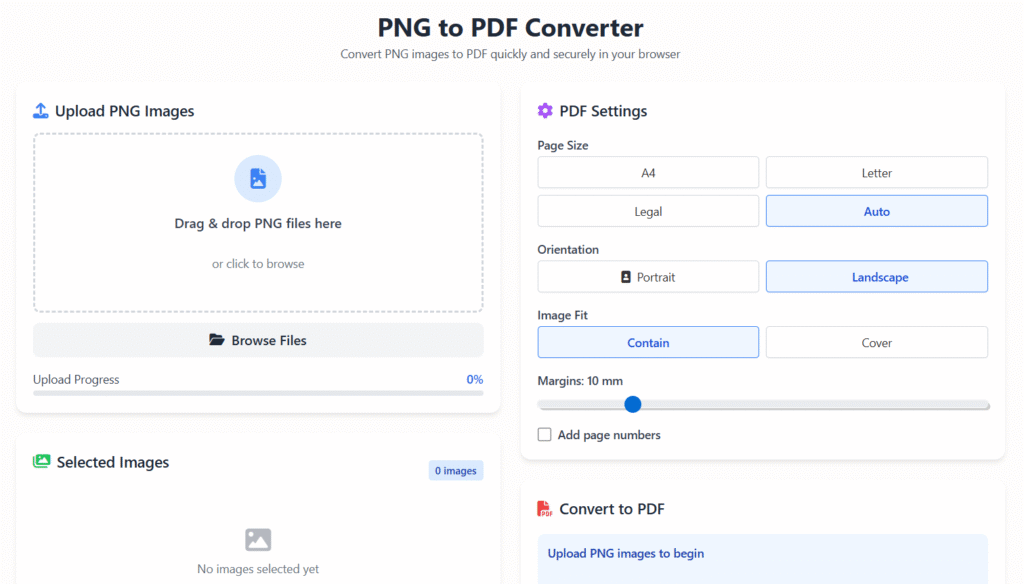
Step-by-Step Guide: How to Convert this tool
Method 1: Using an Online Text to PDF Tool (Fastest)
This is the easiest and most popular method.
Steps:
- Open a reliable text-to-PDF converter website.
- Paste your text or upload a
.txtfile. - Adjust formatting if needed.
- Click “Convert.”
- Download your PDF file.
🟢 Best for: Quick tasks, students, and everyday users.
Method 2: Using Google Docs or Microsoft Word
Google Docs
- Paste your text into a new document.
- Format headings and spacing.
- Click File → Download → PDF Document (.pdf).
Microsoft Word
- Open Word and paste your text.
- Click Save As → PDF.
🟢 Best for: Formatting-heavy documents.
Method 3: Using Mobile Devices
Most smartphones support PDF creation:
- Android: Share → Print → Save as PDF
- iPhone: Share → Print → Pinch-out preview → Save as PDF
🟢 Best for: On-the-go conversions.
Best Free Text to PDF Tools (2025)
Here are commonly used categories (no brand promotion):
✔ Browser-Based Tools
- No signup required
- Fast conversion
- Ideal for short documents
✔ Desktop Tools
- More control over layout
- Offline access
✔ Mobile Apps
- Convenient for quick tasks
- Integrated with cloud storage
💡 Tip: Always check privacy policies before uploading sensitive content.
Common Issues & How to Fix Them
❌ Formatting Looks Broken
✔ Use consistent fonts and spacing before converting.
❌ Fonts Not Displaying Properly
✔ Stick to standard fonts like Arial or Times New Roman.
❌ Large File Size
✔ Remove extra spacing or unnecessary formatting.
❌ PDF Won’t Open
✔ Re-download or try another converter.
Tips to Create a Professional PDF
- Use clear headings and subheadings
- Keep paragraphs short (2–3 lines)
- Use bullet points for readability
- Add page numbers if it’s long
- Maintain consistent margins
- Avoid decorative fonts
These small improvements significantly enhance readability and professionalism.
Text to PDF for Students vs Professionals
🎓 For Students
- Assignments
- Research papers
- Notes and summaries
- Project submissions
💼 For Professionals
- Business reports
- Proposals
- Contracts
- Internal documentation
Both benefit from clean formatting and reliable file sharing.
SEO & Accessibility Tips for PDFs
- Use readable fonts (minimum 11–12 pt)
- Add proper headings
- Avoid image-only text
- Use descriptive file names
These practices improve accessibility and usability.
(FAQs)
Is it safe to convert text to PDF online free?
Yes, if you use reputable tools and avoid uploading sensitive information.
Can I convert text to PDF online free?
Most tools allow free conversions with basic features.
Does converting text reduce quality?
No, PDFs usually preserve text quality perfectly.
Can I edit the PDF later?
Yes, using PDF editors or by converting it back to text.
CTA: Apply What You’ve Learned
You now understand how to convert text to PDF online free using safe and effective methods.
You can apply these steps anytime to create clean, professional documents without hassle.
About the Author
This article was written by a digital content specialist with experience in image optimization, file formats, and document workflows. The goal is to provide practical, accurate guidance for everyday users.
Disclaimer
This guide is for educational purposes only. Tool availability and features may change over time.